Poradniki
Blokowanie AI na telefonach służbowych
Praktyczny przewodnik dla Intune oraz Knox Manage

filtruj po kategorii
Filtruj po autorze

Praktyczny przewodnik dla Intune oraz Knox Manage

Base, Essentials, Enterprise — który plan dla jakiej firmy

Apple pozamiatało! Migracja MDM, logowanie iPhonem i inne nowości

Nowe narzędzia w rękach administratora MDM

Czyli Samsung stworzył narzędzie MDM, które mówi płynnie w trzech językach

Kompleksowy przewodnik, który zaoszczędzi Ci dziesiątki godzin

MDM - o zarządzaniu urządzeniami w organizacji
Zabezpiecz Office 365 wymagając zgodnych urządzeń!

Dogłębna analiza dla małych, średnich, dużych przedsiębiorstw i sektora publicznego (2024/2025)

Jak EMM/MDM wpisuje się w nowoczesną architekturę bezpieczeństwa

🇵🇱 Przejdź do polskiej wersji tego wpisu / Go to polish version of this post
Generative artificial intelligence entered mobile devices so quickly that many IT administrators didn’t even have time to finish their morning coffee, and their users were already dictating emails through Gemini, generating meeting summaries in Galaxy AI, and pasting sensitive customer data into ChatGPT “to format the table nicely.” Sound familiar?
The problem is that all these assistants — regardless of how convenient they are — are data vacuum cleaners. Sometimes they process data locally (not so bad), and sometimes they send it straight to the manufacturer’s cloud (quite a big problem). If you manage a fleet in finance, medicine, administration, or simply in a company that doesn’t want its sales strategy training a competitor’s language model — you need to take control.
Today I’ll show you step by step how to block or restrict AI features in the systems of two MDM market giants: Microsoft Intune and Samsung Knox Manage. Along the way, we’ll “deal with” Apple Intelligence, because iPhones in companies are now standard, not an exotic perk for management.
Before we start, we need to realize one thing: “AI on the phone” is not one magic switch. It’s a hydra with many heads. Microsoft in its documentation divided this into five categories. And this division makes sense:
chatgpt.com. We often forget about this.Good news: each of these heads can be cut off (or at least gagged). Bad news: you have to do it in layers.

Microsoft has done its homework and gives us powerful weapons, especially for devices in Android Enterprise mode (Fully Managed or Work Profile).
This is the first line of defense. If you don’t want employees installing ChatGPT or Copilot.
Scenario A: you have a “closed” store (Allowlist – recommended) – if your users only see in Managed Google Play what you’ve made available to them — congratulations, you’re safe. Simply don’t add AI applications there.
Scenario B: you have an “open” store (all apps available) – you must explicitly block specific titles.
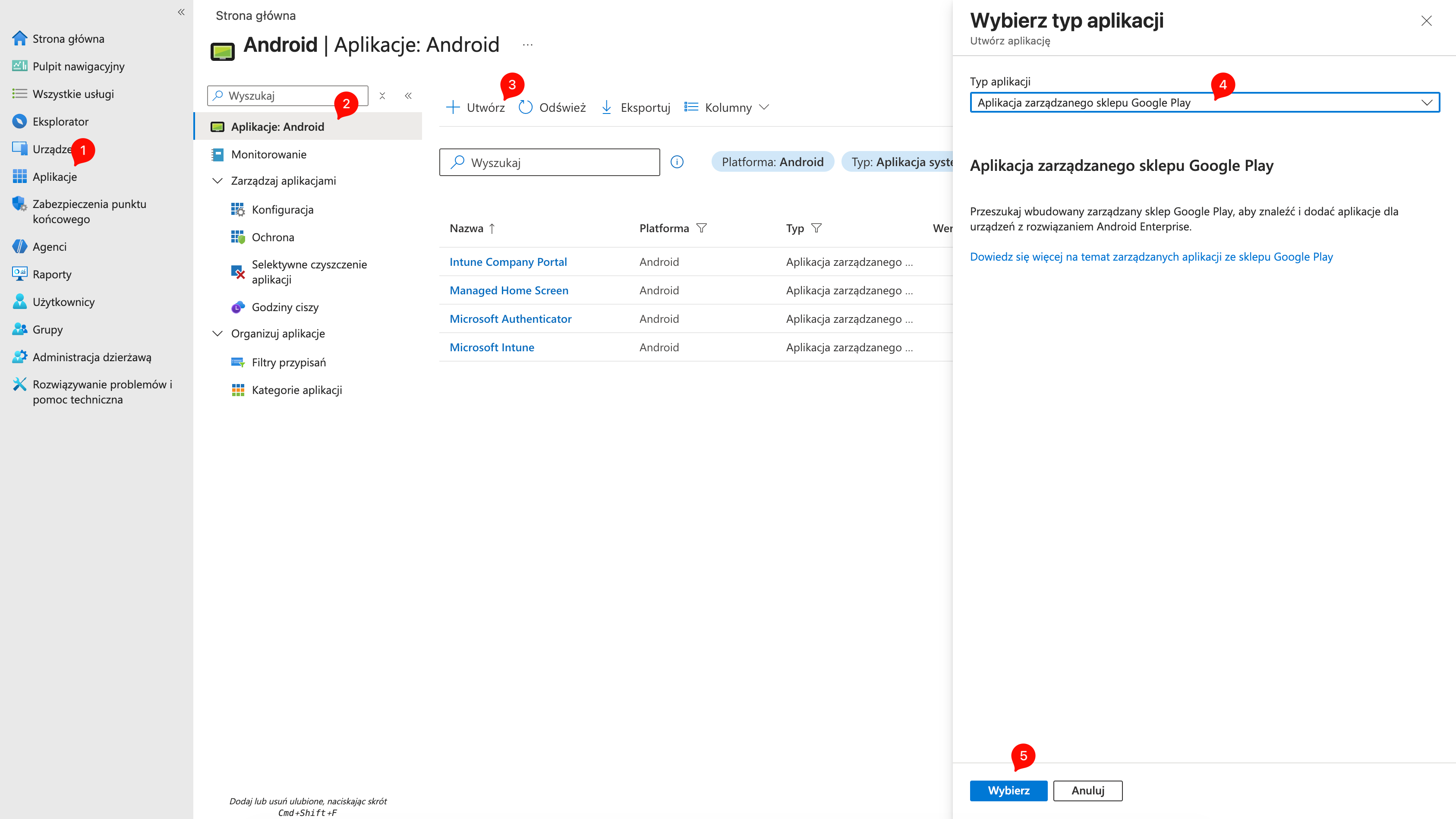
Bundle ID (e.g., com.openai.chatgpt) in the device configuration profile (Device Restrictions -> Restricted apps)Don’t limit yourself to the “big five”. Check monthly for new hits in the Play Store. It’s an arms race.
Blocking the app isn’t enough. We need to seal the browser. Intune allows this to be done elegantly through App Configuration Policies.
For Microsoft Edge (and Chrome analogously):
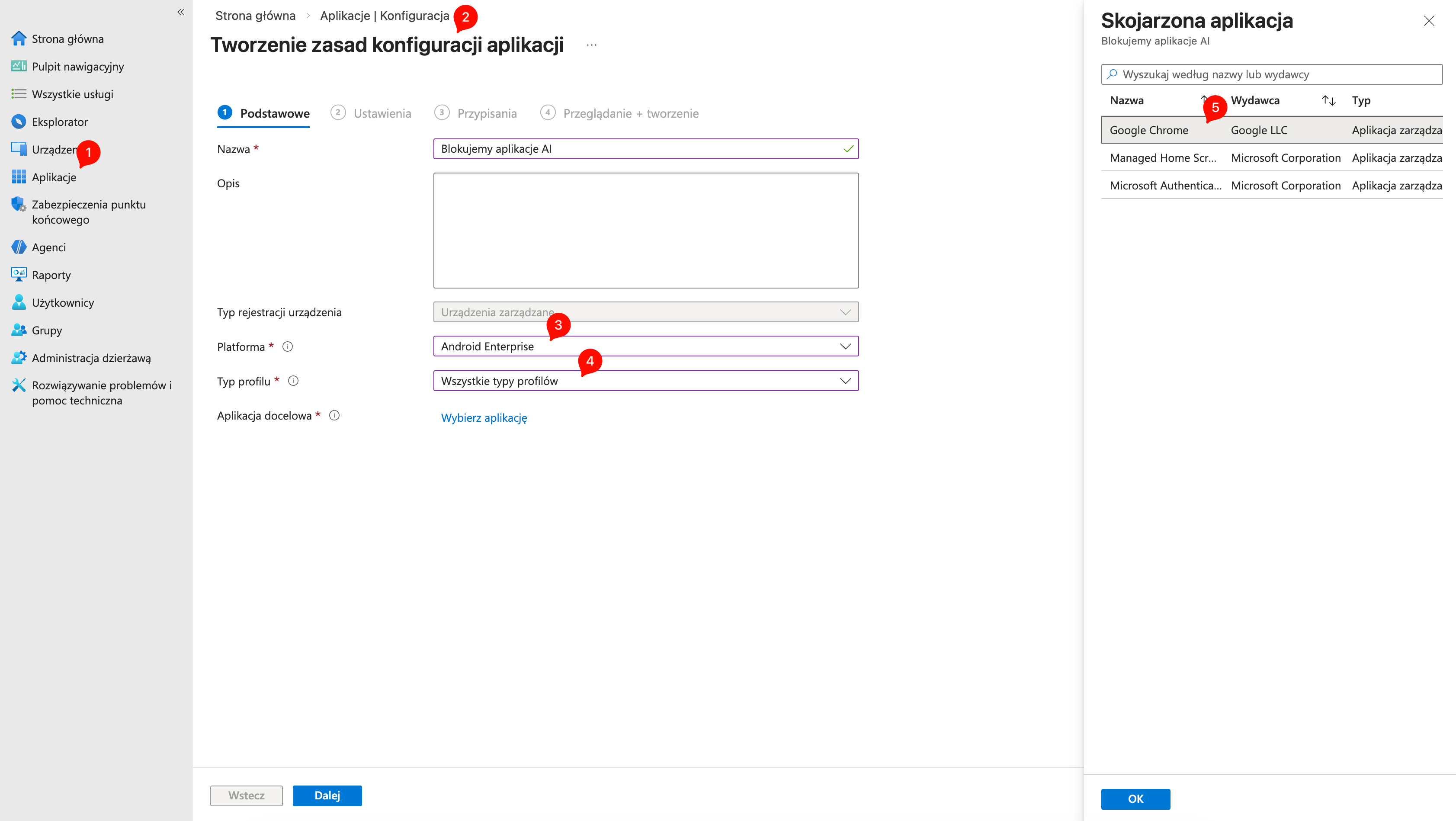
URLBlocklist.["https://chatgpt.com", "https://copilot.microsoft.com", "https://gemini.google.com", "https://claude.ai"]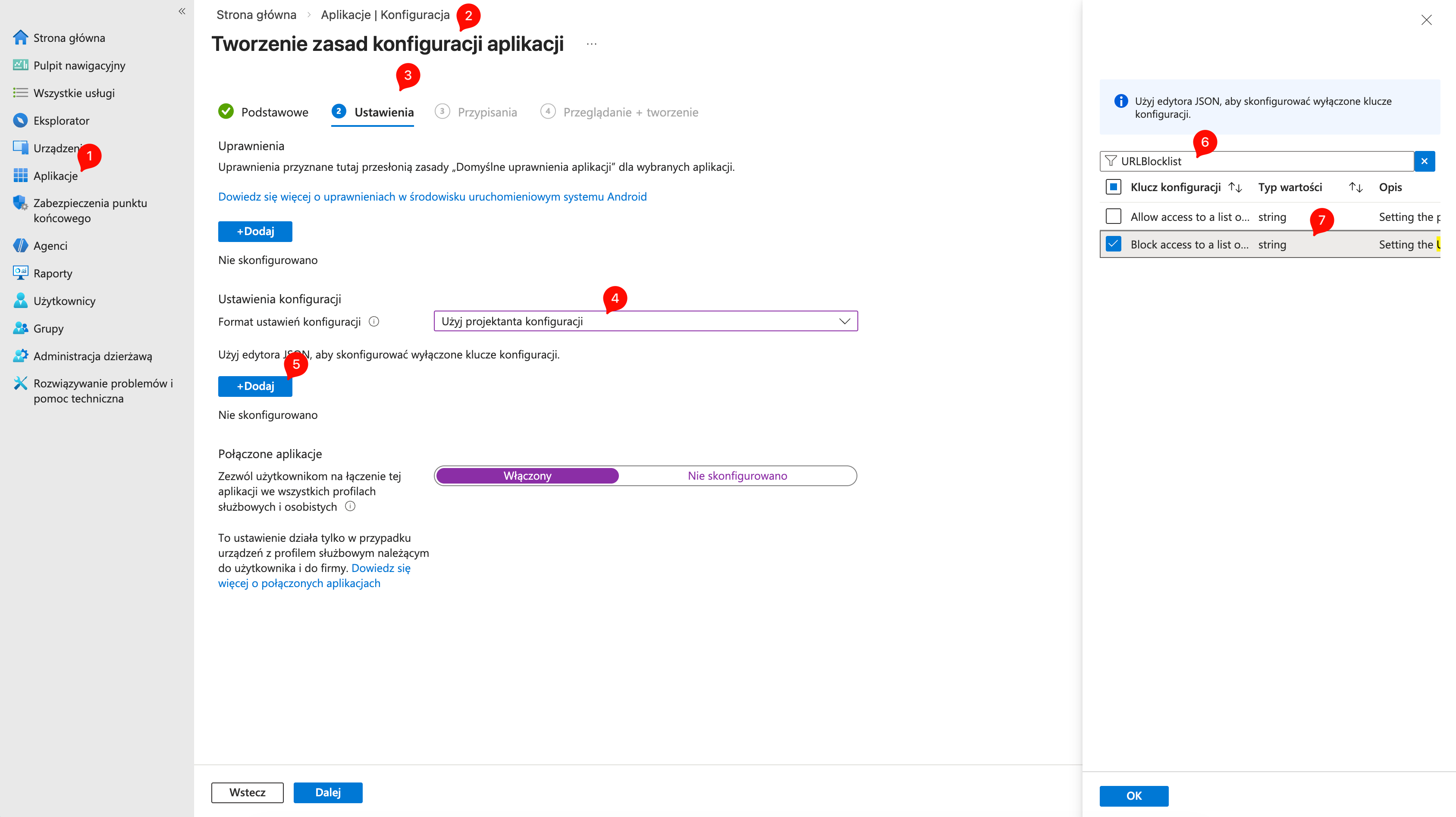
Bonus: removing Copilot from the Edge bar – Copilot “lives” in the Edge browser as a button. To remove it, add in the same policy the key:
com.microsoft.intune.mam.managedbrowser.ChatBooleanFalseThe “Circle to Search” feature is super convenient, but in a company it’s a DLP (Data Loss Prevention) nightmare. We block this in the Settings Catalog.
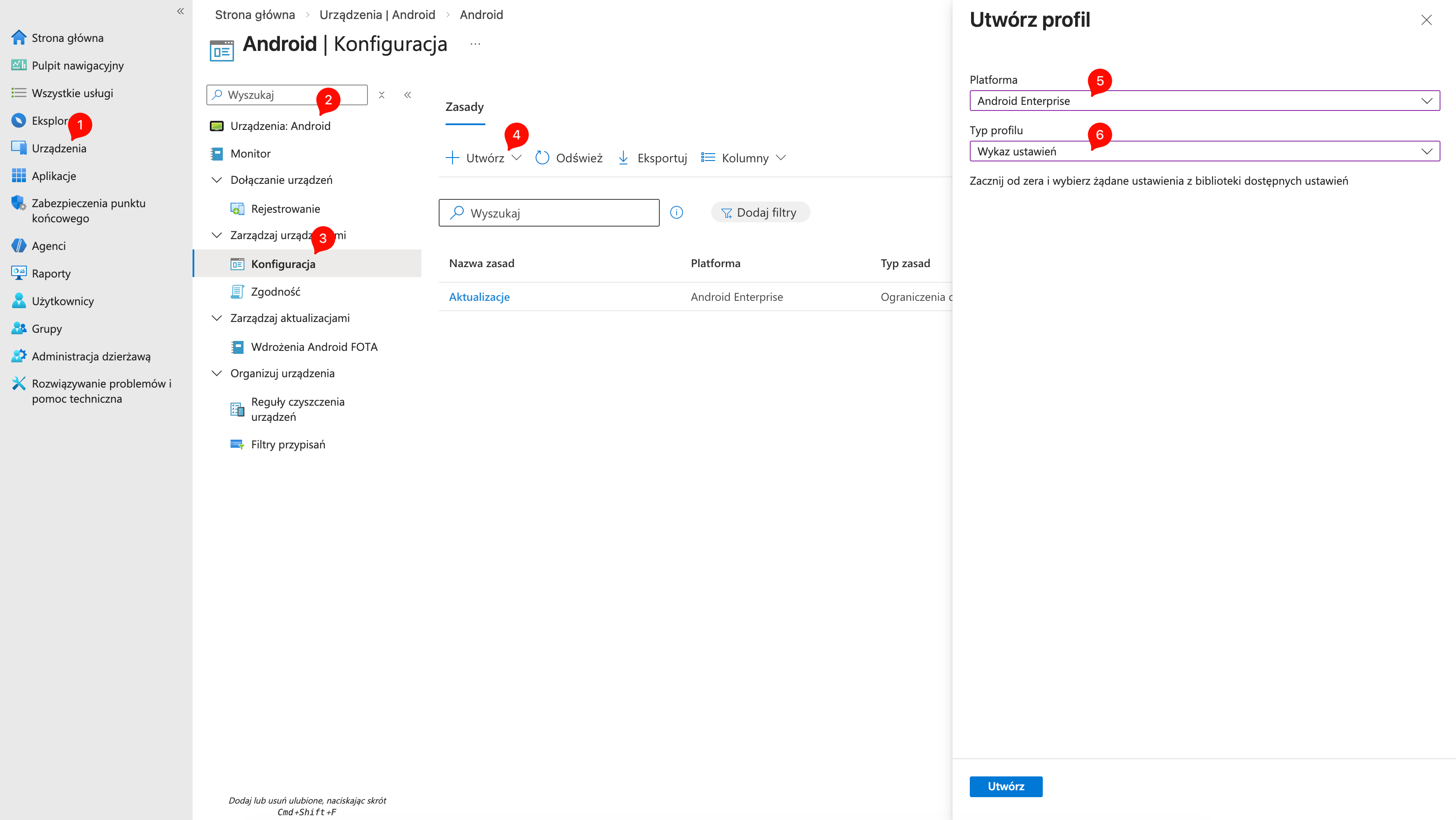
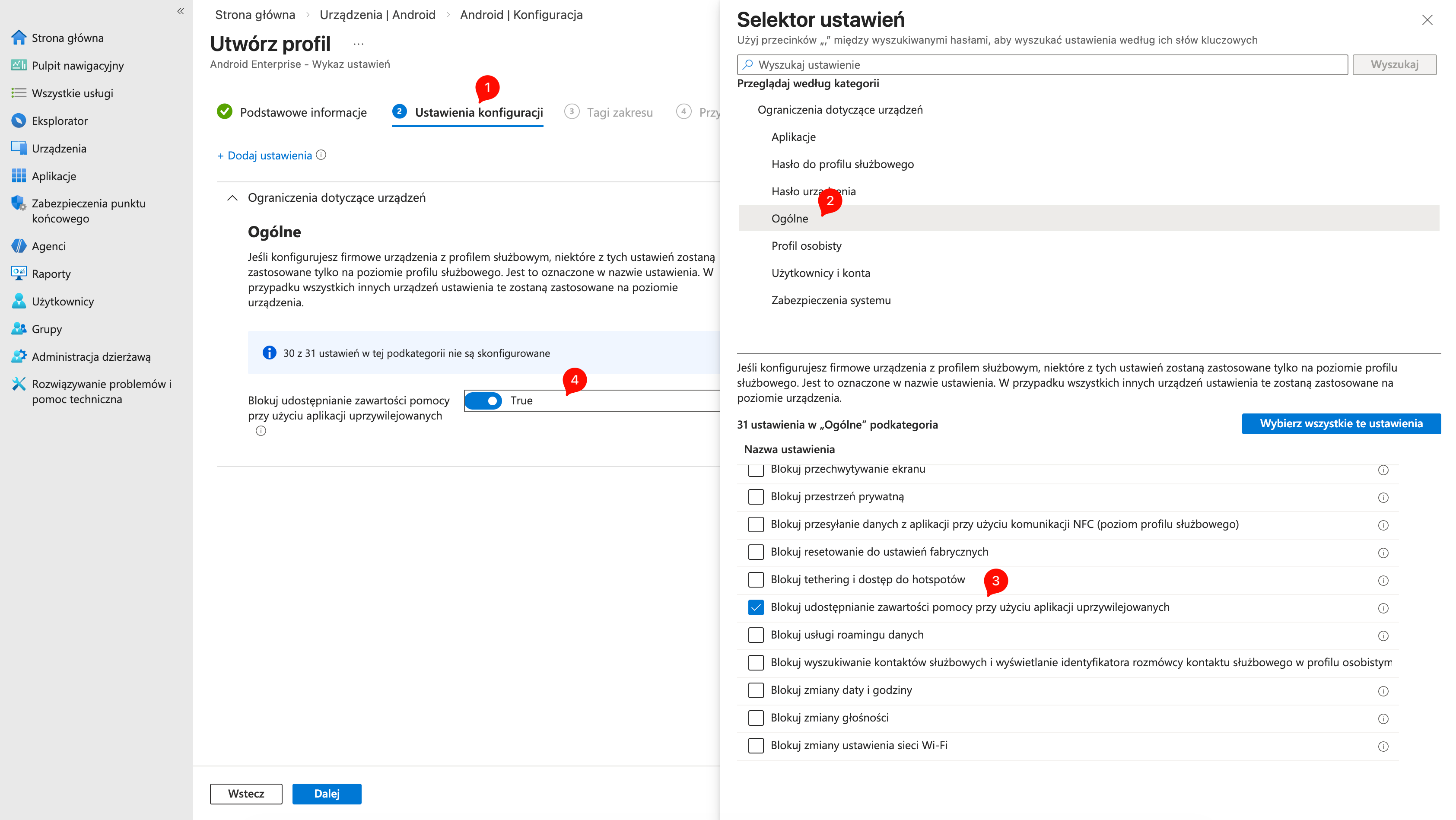
This will prevent Google Assistant from being able to “read” what’s on the screen in the work profile.
Here the matter is simple: Supervised Devices or nothing. If you have BYOD without supervision, your options end with blocking applications. If you have Apple Business Manager — read on.
Apple Intelligence came with iOS 18.1. In Intune you’ll find this in restriction profiles.
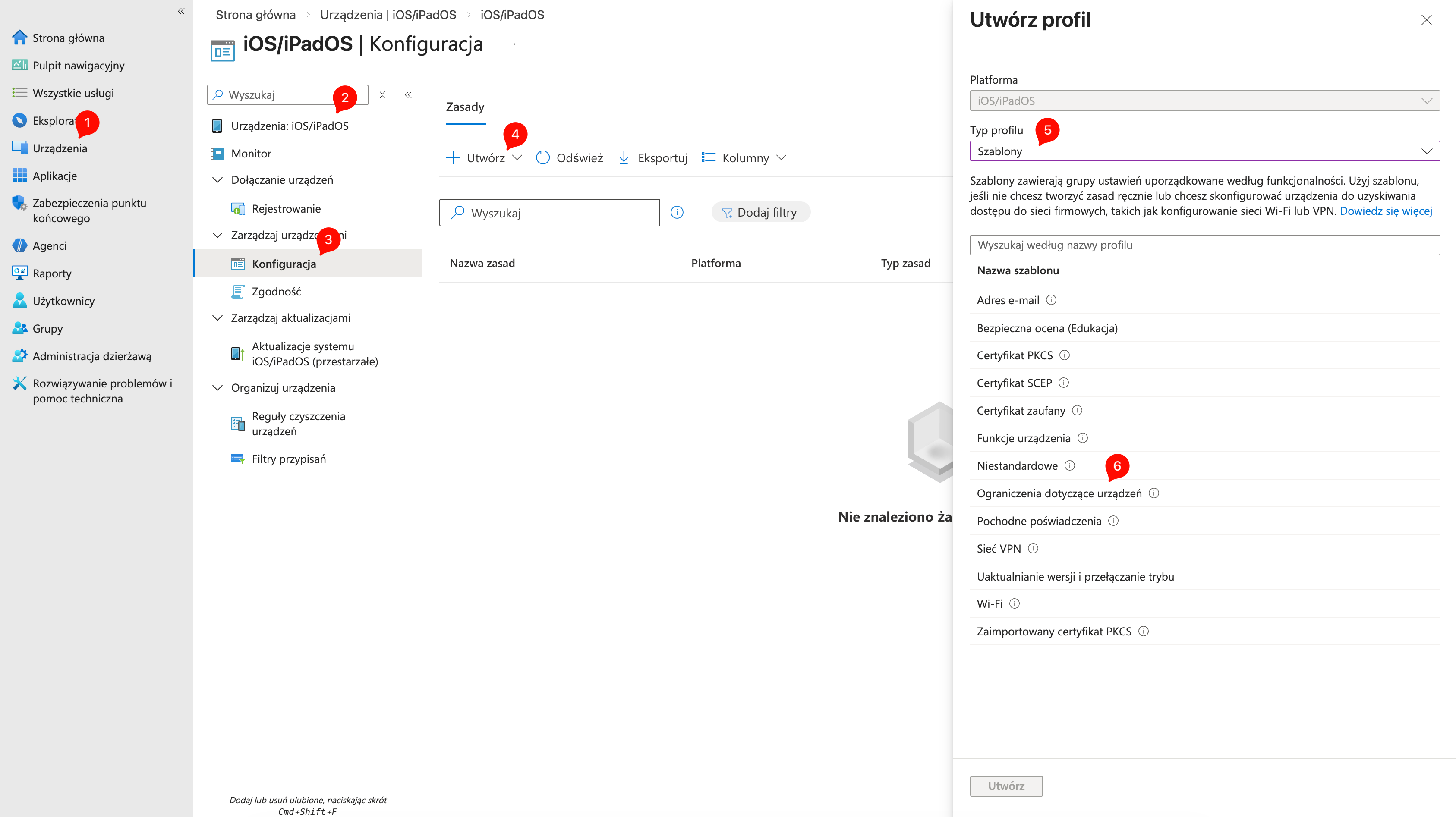
Remember that these features only work on iPhone 15 Pro and newer. On older models, these policies simply won’t change anything because AI isn’t there.
Samsung in the Knox ecosystem gives us tools that others can only dream of. We’re talking about Knox Service Plugin (KSP). It’s an OEMConfig application that allows you to control features deeply embedded in Samsung’s system.
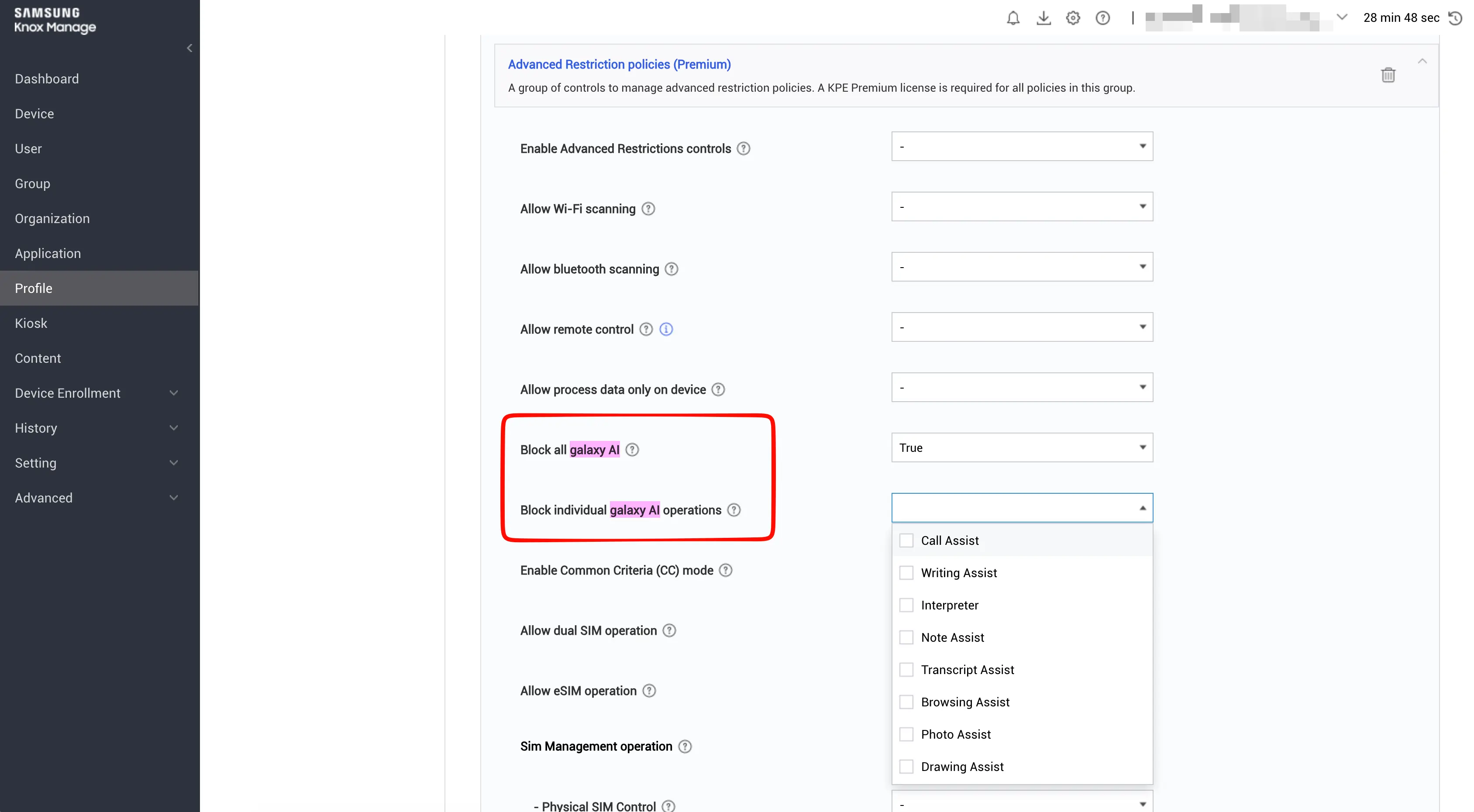
We enter the Android profile edit, Applications section -> Knox Service Plugin -> OEM Configuration (Managed Configurations). We’re looking for the section Advanced Restriction policies (Premium) (names may differ depending on plugin version, look for “Artificial Intelligence”).
Option 1: “Paranoid” (Kill Switch) – we set Block all Galaxy AI to True. Effect: all AI features disappear from phone settings. Clean, safe, brutal.
Option 2: “Compromise” (Local Processing Only) – my favorite option. We look for the setting Allow process data only on device and set it to True. Effect: Galaxy AI works (live translation, notes), but not a single byte of data leaves the phone. Samsung doesn’t send it to the cloud for analysis. This is the perfect balance between modernity and security.
Option 3: “Surgeon” (Granular control) – you can select Block individual Galaxy AI operations and click to block e.g., only “Translator” or only “Notes Assistant”, leaving the rest
| Feature | Microsoft Intune | Samsung Knox Manage |
|---|---|---|
| AI App Blocking (Android) | Yes (Play Store / Compliance) | Yes (Blacklist / Play Store) |
| AI Website Blocking (Browser) | Yes (Edge/Chrome App Config) | Yes (Samsung Internet Policy) |
| Circle to Search (Screen analysis) | Yes (Settings Catalog) | Yes (Through KSP) |
| Galaxy AI — complete block | Yes (via OEMConfig*) | Yes (Natively in KSP) |
| Galaxy AI — local only | Yes (via OEMConfig*) | Yes (Natively in KSP) |
| Apple Intelligence (iOS 18.1+) | Yes (Supervised devices) | Yes (MDM restriction profile) |
| Disable Copilot in Edge | Yes (App Config) | Yes (App Config) |
Don’t fight windmills. If you block everything “hard”, people will start bringing private laptops and phones to “get the job done faster”. The best strategy is Local Processing on Samsungs and Managed App Protection on others, combined with a clear company policy: “Listen, we have corporate Copilot with an Enterprise license — use that because data is protected there. Don’t upload files to free ChatGPT”. Technology is one thing, education is another. But it’s worth having a kill-switch in Knox handy 😎
Microsoft Learn: Manage AI on Android Enterprise
Samsung Knox: Data processing for Galaxy AI
Microsoft Tech Community: Intune support for Apple Intelligence
Below you’ll find a ready-made “blocking” batch. I dug through the Play Store, forums, and security reports. The topic is tricky because some of the “applications” are still Web-first solutions (working in the browser), not native mobile apps. Administrators often forget about this – they look for a package to block, don’t find it, and think “phew, all clear”. Meanwhile, the user just goes through Chrome.
That’s why I divided this list into two sections: .apk packages to block (Android) and domains to cut out (Web) – for those services that don’t yet have an official app but are “dangerous”.
📦 Section 1: mobile applications (Android Package Names) – this is a ready list to put into an Application Blacklist (Knox) / Restricted Apps (Intune) profile.
🚨 Category: Large models & official players
This is the foundation. If you don’t block this, it’s like leaving the server room door open.
| App Name | Package Name (Package ID) | Notes |
|---|---|---|
| ChatGPT (OpenAI) | com.openai.chatgpt | Absolute #1 among corporate employees |
| Microsoft Copilot | com.microsoft.copilot | Pure evil 😈 |
| Google Gemini | com.google.android.apps.bard | Old “bard” ID still applies |
| Claude (Anthropic) | com.anthropic.claude | Very popular in IT/Dev |
| Perplexity | ai.perplexity.app.android | AI search engine |
| DeepSeek | com.deepseek.chat | Chinese hit, cheap API, huge popularity |
| Microsoft Bing | com.microsoft.bing | Has built-in AI chat |
| Microsoft Edge | com.microsoft.emmx | Has built-in Copilot sidebar |
| Poe (Quora) | com.quora.poe | Aggregator (access to many models in one) |
| Pi (Inflection) | ai.inflection.pi | Personal assistant |
| HuggingChat | co.huggingface.chat | Open-source models |
| DuckDuckGo | com.duckduckgo.mobile.android | Their “AI Chat” is built into the browser |
This is a plague. Thousands of apps named “AI Chat” that use the OpenAI API. Users install them en masse when the official app is blocked. I selected the most popular ones (millions of downloads).
| App Name | Package Name (Package ID) |
|---|---|
| ChatOn | com.fitech.chat |
| Ask AI | com.codeway.chataskai |
| Nova | com.scaleup.chataihub |
| Genie | com.appnation.genie |
| AI Chat Open Assistant | com.aichat.app |
| ChatBox | com.aichat.chatbox |
| ChatAI | com.sea.chat |
| Smart AI Chat | com.talk.al.chat |
| Monica | com.monica.im |
| Sider | com.sider.ai |
These applications “listen” and do transcription in the cloud.
| App Name | Package Name (Package ID) |
|---|---|
| Otter.ai | com.aisense.otter |
| Fireflies.ai | com.fireflies.app |
| Notta | com.langogo.transcribe |
| Krisp | ai.krisp.app |
| Tl;dv | com.tldv.app |
🎨 Category: Graphics and video (copyright / deepfake)
| App Name | Package Name (Package ID) |
|---|---|
| Leonardo.ai | ai.leonardo.app |
| Lensa | com.lensa.app |
| Wonder | com.codeway.aware |
| Imagine | com.vyro.ai.art |
| Photomath | com.microblink.photomath |
💔 Category: “Companions” and NSFW (image risk)
| App Name | Package Name (Package ID) |
|---|---|
| Character.AI | ai.character.app |
| Replika | ai.replika.app |
| Chai | com.beauchamp.chai |
| Talkie | com.talkie.ai |
| Poly.AI | com.marupa.chat |
📥 Ready to copy (CSV)
App Name,Package Name,Category
ChatGPT,com.openai.chatgpt,Global AI
Microsoft Copilot,com.microsoft.copilot,Global AI
Google Gemini,com.google.android.apps.bard,Global AI
Claude,com.anthropic.claude,Global AI
Perplexity,ai.perplexity.app.android,Search AI
DeepSeek,com.deepseek.chat,Global AI
Poe,com.quora.poe,Aggregator
Microsoft Bing,com.microsoft.bing,Search AI
ChatOn,com.fitech.chat,Wrapper
Ask AI,com.codeway.chataskai,Wrapper
Nova,com.scaleup.chataihub,Wrapper
Genie,com.appnation.genie,Wrapper
Monica,com.monica.im,Productivity
Sider,com.sider.ai,Productivity
Otter.ai,com.aisense.otter,Meeting Recorder
Fireflies,com.fireflies.app,Meeting Recorder
Notta,com.langogo.transcribe,Meeting Recorder
Leonardo.ai,ai.leonardo.app,Image Gen
Lensa,com.lensa.app,Image Gen
Character.AI,ai.character.app,Entertainment
Replika,ai.replika.app,Entertainment
Chai,com.beauchamp.chai,Entertainment
DuckDuckGo,com.duckduckgo.mobile.android,Search AI
Pi,ai.inflection.pi,Personal AI
HuggingChat,co.huggingface.chat,Dev AI
🌐 Section 2: “Ghosts” (web-first services)
Applications that don’t have official, native applications in the Play Store (or are in beta/not publicly available). Users access them through the browser. To block them, you must use Web Content Filter (Intune/Knox). Blocking the package won’t help because the package doesn’t exist.
| Service | URL to block | App status (Android) |
|---|---|---|
| Mistral Le Chat | chat.mistral.ai | No official app (only wrappers) |
| Manus | manus.ai | No app (there’s a “Manus” app in the store, but it’s a VR glove controller!) |
| Abacus.AI | abacus.ai | Enterprise platform, mainly web |
| Midjourney | discord.com / midjourney.com | Only works through Discord or Web |
| Suno AI | suno.com | Music generator, no app |
| Groq | groq.com | Not to be confused with Grok from X – web platform |
| Grok (xAI) | x.com (part of Twitter/X) | Only available inside the X (Twitter) app |
Until next time!



 Follow.it