Analizy
Knox Firewall i ZTNA
Jak Samsung zamyka drzwi, których inni nawet nie widzą

filtruj po kategorii
Filtruj po autorze

Jak Samsung zamyka drzwi, których inni nawet nie widzą

Praktyczny przewodnik dla Intune oraz Knox Manage

Base, Essentials, Enterprise — który plan dla jakiej firmy
Apple pozamiatało! Migracja MDM, logowanie iPhonem i inne nowości
Nowe narzędzia w rękach administratora MDM
Czyli Samsung stworzył narzędzie MDM, które mówi płynnie w trzech językach

Kompleksowy przewodnik, który zaoszczędzi Ci dziesiątki godzin

MDM - o zarządzaniu urządzeniami w organizacji
Zabezpiecz Office 365 wymagając zgodnych urządzeń!

Dogłębna analiza dla małych, średnich, dużych przedsiębiorstw i sektora publicznego (2024/2025)
🇵🇱 Przejdź do polskiej wersji tego wpisu / Go to polish version of this post
Hey!
Today we’re tackling a topic that should interest every admin managing a Samsung fleet. The Hacker News recently published an article about how Samsung Knox helps protect corporate networks. It’s a Samsung-sponsored article, so you need to read it with an appropriate marketing filter — but beneath the PR gloss, there are really concrete features worth knowing about, because they’re changing the game.
The truth is brutal: Your companies spent a fortune on edge firewalls, IDS/IPS systems, and Threat Intelligence platforms for servers. Meanwhile, mobile devices are flying under the radar. A real-life scenario? A salesperson’s smartphone connects to secure Wi-Fi at the office in the morning. At noon, it catches a free hotspot at a coffee shop to send a quote (and catch a „stowaway” in the process). In the evening, it lands on the home network, where a child’s infected laptop is operating nearby.

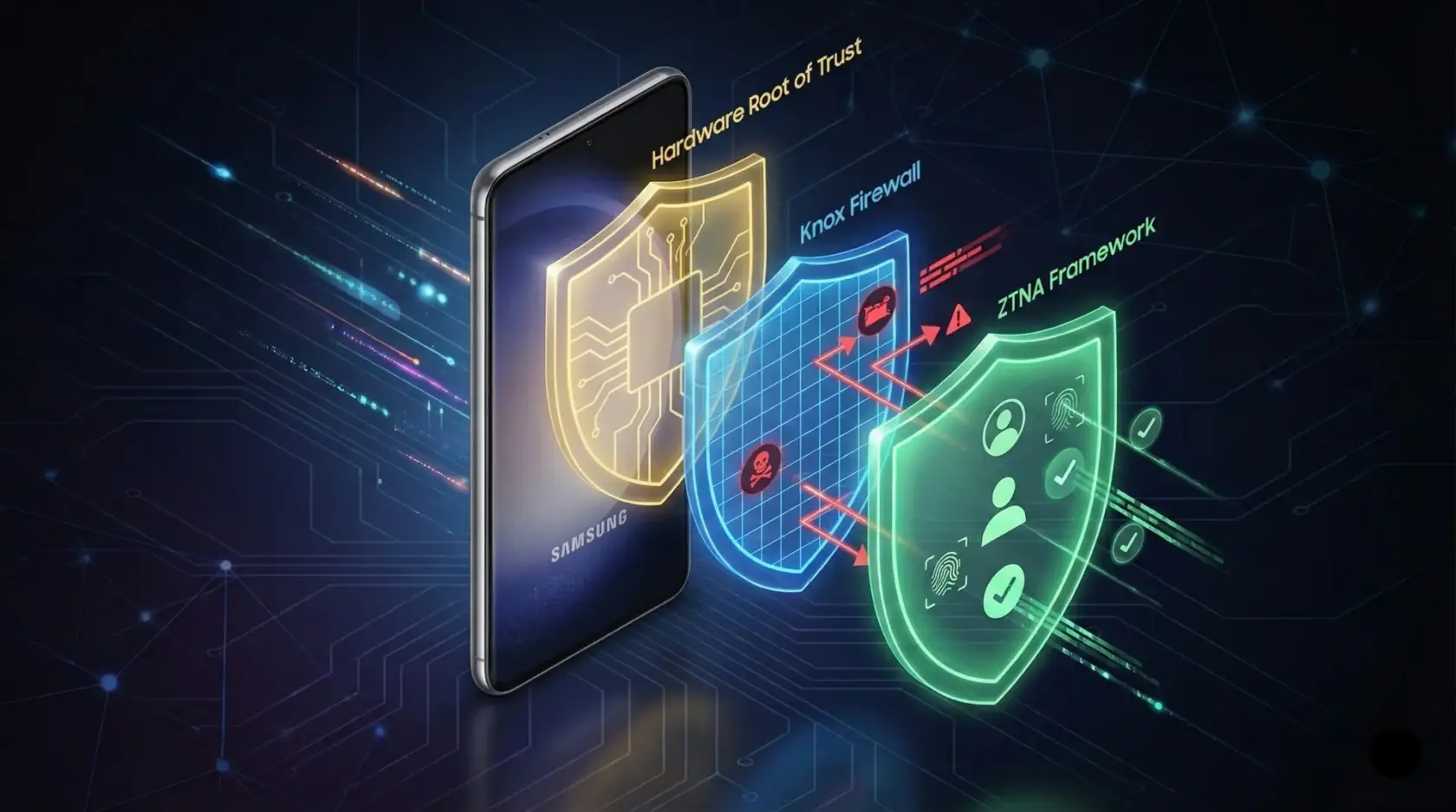
If this smartphone is a „gateway” to your company (and it is), you’ve just left it ajar. Today we’ll check how Samsung Knox tries to slam it shut using two mechanisms: Knox Firewall and Knox ZTNA Framework.
If you’re interested in mobile security in the context of Zero Trust, today’s post is a natural extension of what I wrote about earlier.
Most firewall solutions on mobile devices I’ve dealt with work in binary: either you block traffic or you allow it. The whole device = one big switch. It’s like treating a headache with a guillotine – effective, but not very practical.
Samsung approaches the topic differently in Knox Firewall – it gives us granular control at the individual application level (Per-app network controls). What does this mean in practice for an admin? We can define that an application for viewing confidential documents should only have access to specific IP addresses of our servers. A video conferencing app can only connect to approved service provider domains. Chrome browser can have access to specific sites blocked. Each application gets its own network „passport” tailored to its risk profile — it’s not thrown into one bag with the rest.
Knox SDK technical documentation reports that the firewall supports four types of rules: Allow, Deny, Redirect, and Redirect Exception. We can slice traffic by IP, ports, and even interface type (e.g., we block YouTube on cellular data but allow it on Wi-Fi). Both IPv4 and IPv6 protocols are supported — which in 2026 should be obvious, but in the MDM world, it sometimes isn’t.
If you’re implementing firewall rules in Knox, remember: IPv4 rules have no effect on IPv6 traffic and vice versa! You must define policies separately for each protocol version. I’ve already seen environments where an admin configured a „fortress” on IPv4, and traffic happily leaked through an unsecured IPv6 tunnel. Don’t go down that path.
But blocking itself isn’t the most interesting thing here. In my opinion, Knox Firewall shows its real value in the area of visibility. When a user (or background application) tries to connect to a blocked domain, the system logs the event with full context: the package name of the application that tried to connect, the address of the blocked domain or IP, and the event timestamp. For security teams conducting threat hunting or responding to incidents, this level of detail can shorten an investigation from several days to several hours.
Knox Firewall also supports domain and subdomain filtering — we can block *.example.com with one rule, but simultaneously allow secure.example.com. Everything works both in per-app mode (rules per application) and device-wide (rules for the entire device).
What’s important from an implementation perspective: Knox Firewall is not a separate application or agent that needs to be installed. It’s built into the Samsung device architecture and uses the iptables mechanism at the system level. We configure it through Knox Service Plugin (KSP) from our MDM system — whether it’s Knox Manage, Microsoft Intune, or another solution supporting KSP, such as solutions popular in the Polish market from Proget or Techstep.
Using the system iptables mechanism (good old Linux) is very efficient, but… it has its quirks. Because it’s based on iptables, it can conflict with other functions using the same stack – e.g., with tethering or third-party VPN clients. The good news is that since Knox version 3.2.1, Samsung has rebuilt this process and now VPN connections are established only after firewall rules are loaded, which minimizes the risk of conflicts.
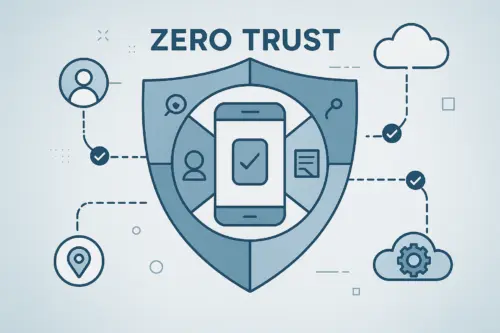
I’ve already written about Zero Trust in the context of the role of mobile devices in this architecture and how Conditional Access in Azure AD helps verify device compliance before granting access to cloud resources. Knox ZTNA Framework brings this philosophy directly to the device.
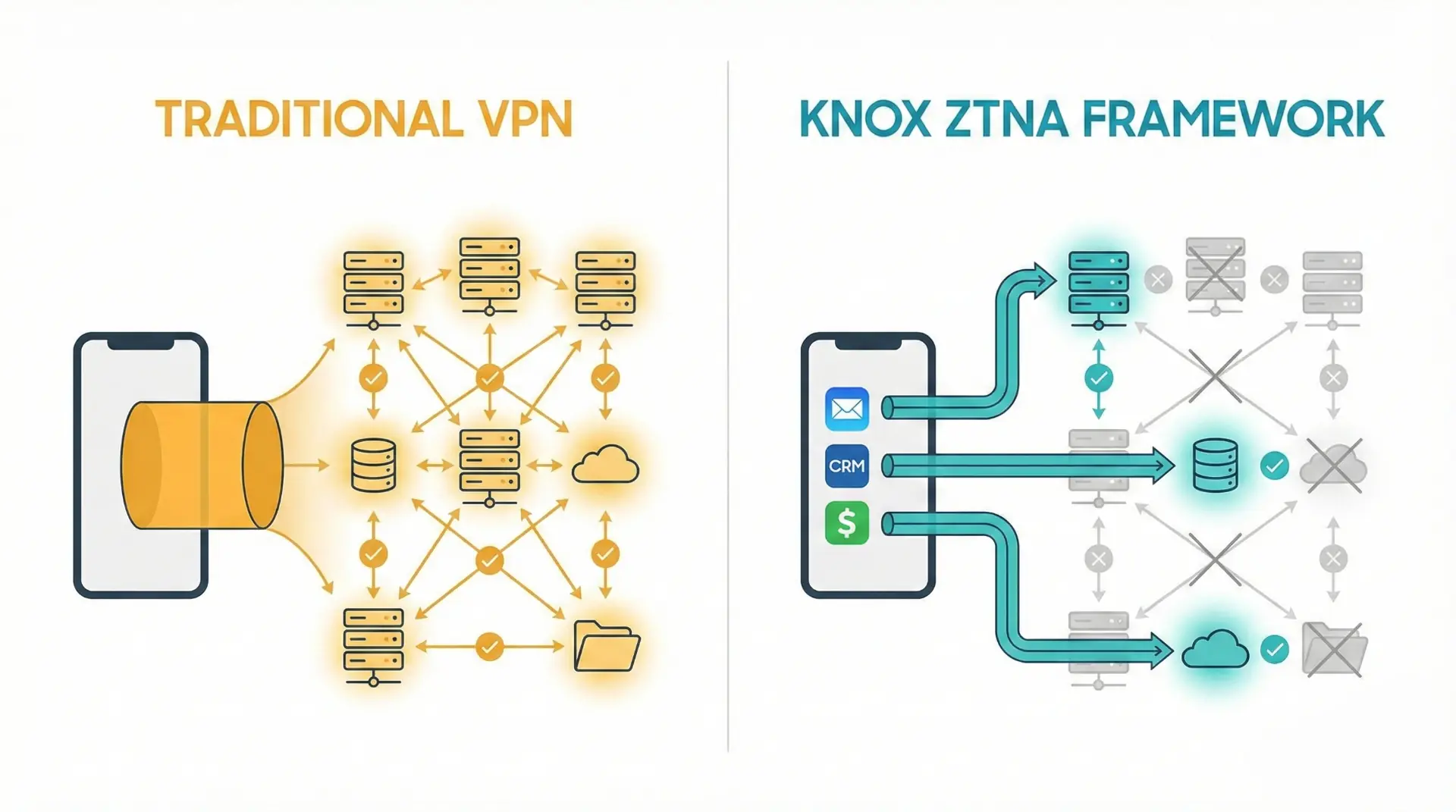
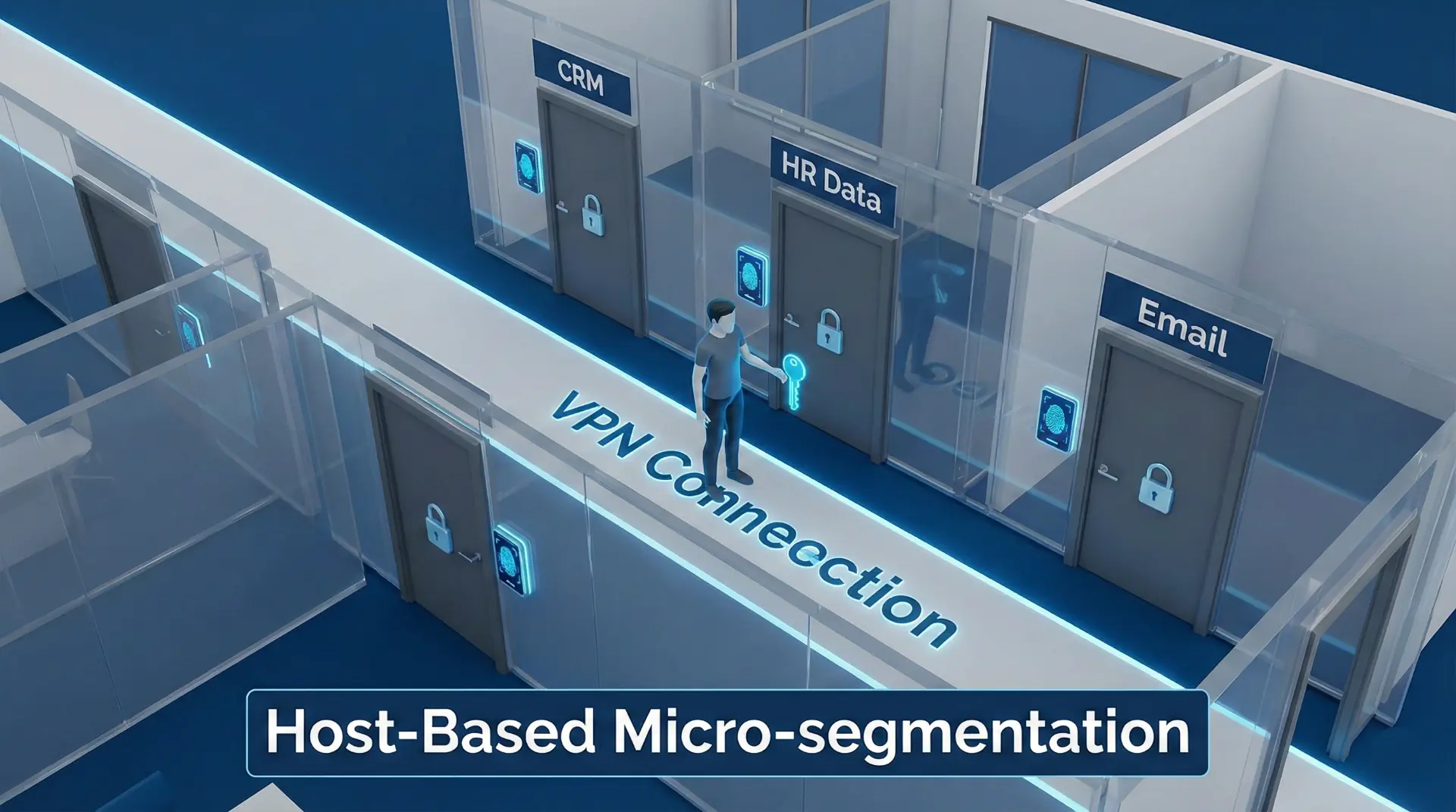
Traditional VPN is a „Fortress” model. Once you get inside (establish a tunnel), you usually have access to a large part of the network. If malware breaks through this one point, it can roam throughout the entire infrastructure (so-called Lateral Movement). Knox ZTNA introduces host-based microsegmentation. Imagine that entering the VPN only lets you into the corridor. To enter a specific room (application), you need a separate key.
The framework supports three protocols: UDP, TCP, and DNS. It offers split DNS tunneling, which allows DNS queries to be routed selectively — internal queries go through the ZTNA tunnel, and external ones go directly to public DNS servers. This improves both security (internal domain names don’t leak to public resolvers) and performance (we don’t overload the tunnel with unnecessary traffic).
From a security policy perspective, one of the most interesting features is contextual metadata injection. Knox ZTNA enriches network traffic with information such as application package name, application signature, and application version. This data goes to the Policy Decision Point, which decides dynamically: „Okay, this is John, but he’s connecting from an outdated version of Outlook on a rooted phone. BLOCKED”. This is not a one-time verification at login, as with classic VPN — policy evaluation occurs with each access request, based on the current context of the device and application.
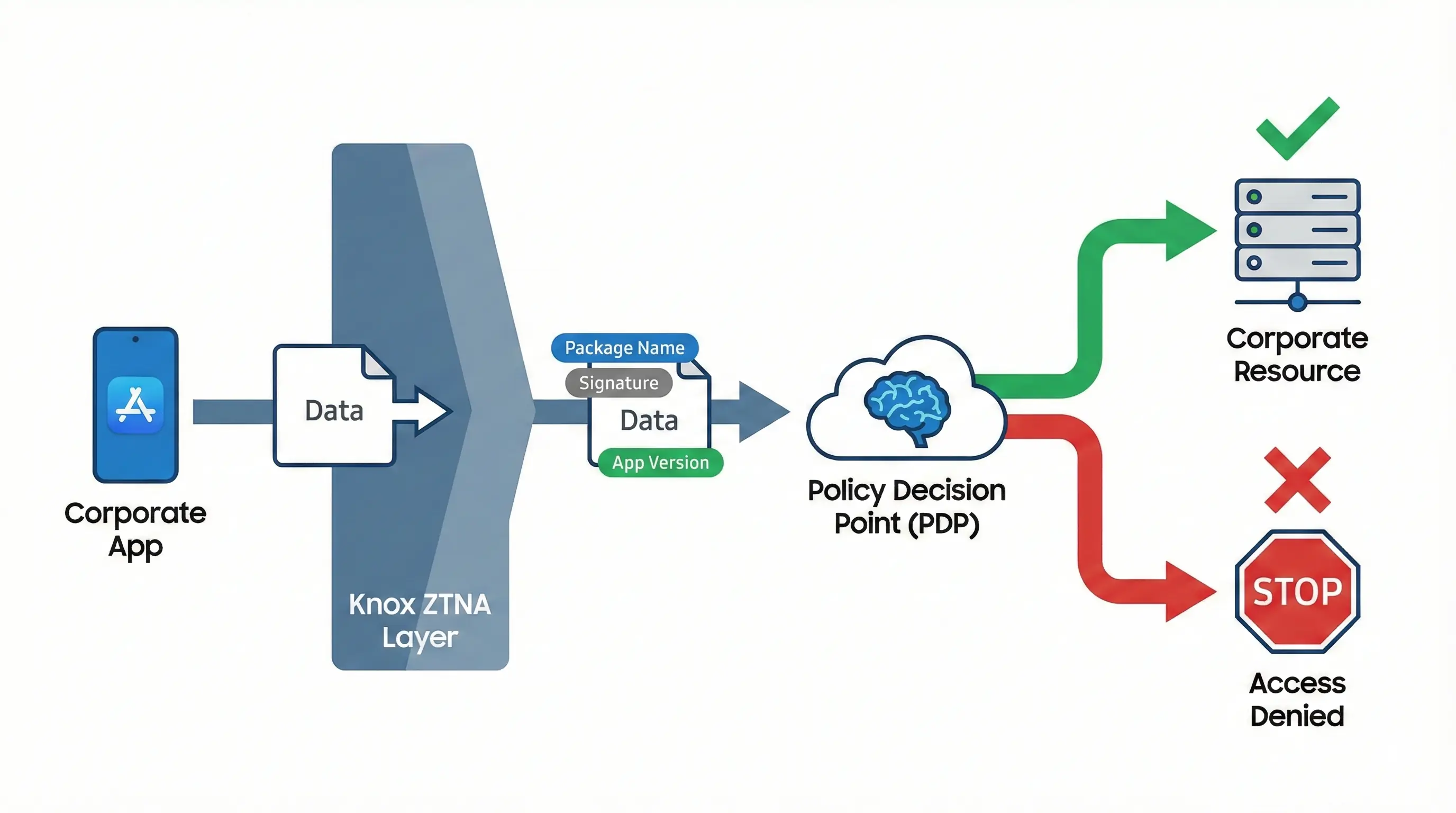
Knox ZTNA Framework doesn’t replace existing VPN. It was designed to coexist with classic VPN. You can migrate services gradually – e.g., you route critical CRM through ZTNA, and the rest of the traffic through the old tunnel.
Currently, Knox ZTNA Framework is available as part of Samsung’s partnership with Cisco Secure Access. On managed devices (fully managed or with work profile), it requires Android 14 or newer and a free Knox Platform for Enterprise Premium license. On unmanaged devices (BYOD), it works from Android 15 onwards and doesn’t require a KPE license — the user just needs to install the ZTNA client from the Play Store. This is a fairly flexible approach that addresses both full management and BYOD scenarios.
The Hacker News article rightly emphasizes one thing: Knox is not a collection of separate tools, but an integrated system. Threat signals flow between platform components in real-time. A phishing alert can automatically trigger a new firewall rule. A change in device health status (e.g., root detection) can block access to corporate resources without administrator intervention.
In addition to the network layer (Firewall/ZTNA), Samsung has powerful infrastructure working „underneath” that marketing talks about less often, which is a shame.
This integration is possible because Knox is built into Samsung Galaxy devices — from the chip level, through the system kernel, to the application layer. We don’t need separate agents from three different vendors, each requiring a separate license, separate console, and separate troubleshooting session. Knox is SOC 2 certified, GDPR-ready, and compatible with leading MDM/UEM/SIEM platforms.
By the way, Samsung isn’t resting on its laurels and isn’t idle in other areas of network security. In One UI 8, which will appear on upcoming Galaxy smartphones, Samsung is introducing Secure Wi-Fi with quantum-resistant encryption, certified according to the NIST FIPS 203 (ML-KEM) standard. In practice, this means traffic protection on public Wi-Fi networks with an algorithm designed to be resistant to attacks using quantum computers. The feature offers free protection up to 1024 MB monthly on Android 13 and newer.
If you manage a Samsung device fleet through an MDM system (and if you’re reading this blog, you probably do), Knox Firewall and ZTNA Framework give you tools that just a few years ago were only available on workstations with full endpoint security agents. Granular network traffic control per application, detailed logs of access attempts, device-level microsegmentation, dynamic policy evaluation — all this on a smartphone, without installing anything additional.
At the same time, we need to be honest: these advanced features work fully only on Samsung Galaxy devices with an activated Knox Platform for Enterprise license. If your fleet is a mix of manufacturers (Samsung, Motorola, Xiaomi, Google Pixel), Knox Firewall and ZTNA Framework won’t work on devices from other brands. In a mixed fleet scenario, you still need an MDM solution that provides a basic level of security on all devices — and you can use advanced Knox features as an additional layer on Samsungs. I wrote about this in the context of the Knox Suite ecosystem and its three licensing plans — it’s worth returning to that article to see which features are available at which level.
In my opinion, Samsung is building something that can be called „defense in depth” at the individual mobile device level. Knox Firewall provides control at the network layer, ZTNA Framework implements Zero Trust at the access layer, Knox Vault protects credentials at the hardware layer, and everything is integrated with the MDM/UEM ecosystem through Knox Service Plugin. As an admin who has spent thousands of hours in various MDM consoles, I can say that Samsung takes mobile device security more seriously than most competitors (and no one paid me for that opinion ¯_(ツ)_/¯). Does this mean that a Samsung device with Knox is impregnable? Of course not. But it certainly raises the bar so high that for most threats it becomes an unprofitable target.
Until next time!



 Follow.it