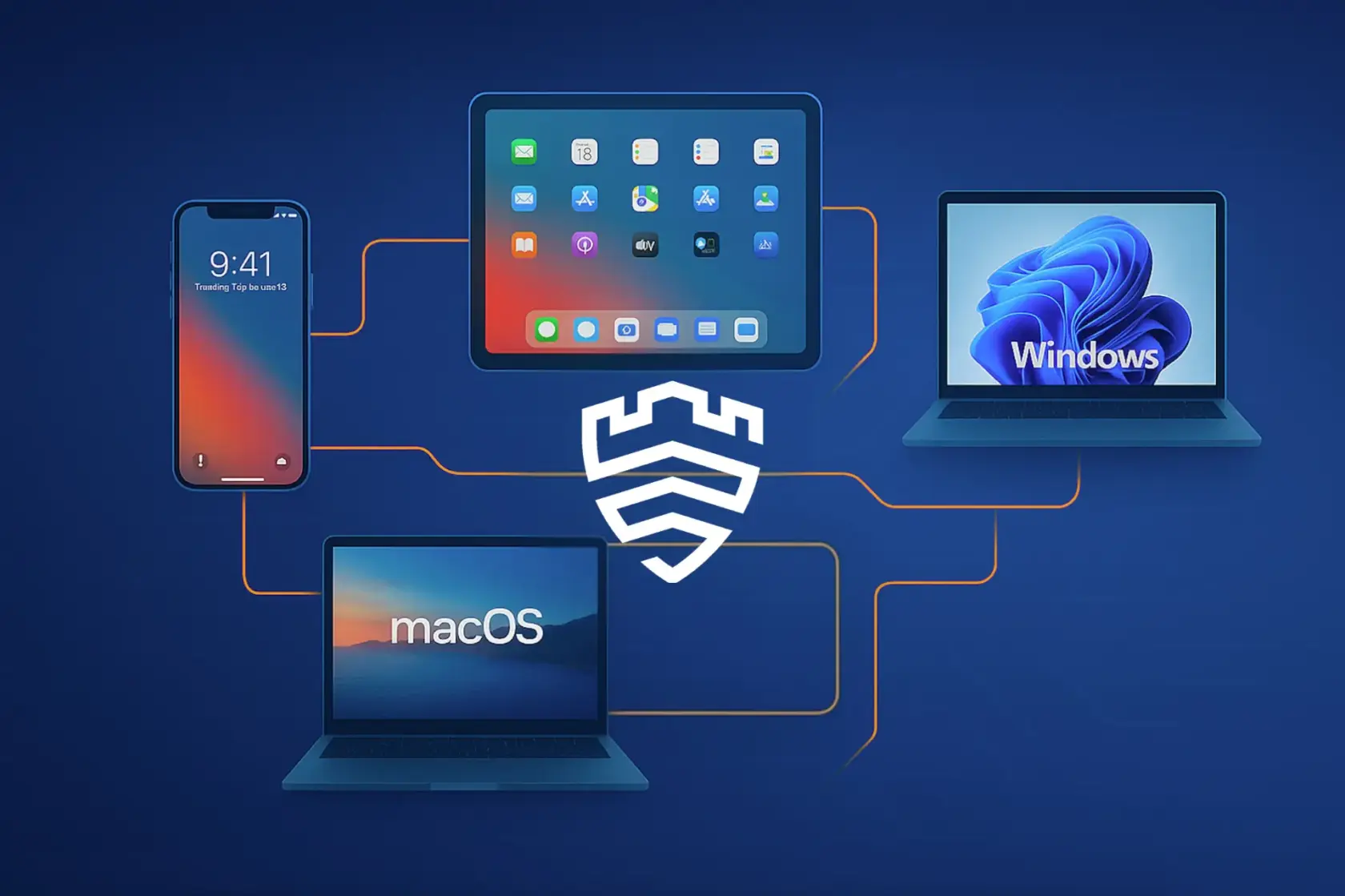
Today we’re taking a look at the Samsung Knox Manage system, but not only in the context of Android devices, with which it is most commonly associated. It turns out that Knox Manage handles quite well the management of a fleet of devices with the bitten apple logo (iOS, iPadOS, macOS) and Microsoft windows (Windows 10/11). Yes, yes, you’re reading correctly! Samsung has decided to meet the needs of companies that have a real technological ZOO in their resources.
Before we start – general preparations
Before we dive into the configuration whirlwind, there are a few things we need to take care of globally, regardless of whether we’ll be managing the boss’s iPhone or the new intern’s Windows laptop.
Key to the Apple world: APNs certificate
If you’re thinking about managing Apple devices (iOS, iPadOS, macOS), there’s one thing you can’t do without – we’re talking about the APNs certificate (Apple Push Notification service). It’s like a digital postman that delivers commands from the Knox Manage console straight to Apple devices. Without it, your iPhones and MacBooks will be deaf to the administrator’s calls.
In Knox Manage, the configuration is as simple as building a flail (well, almost):
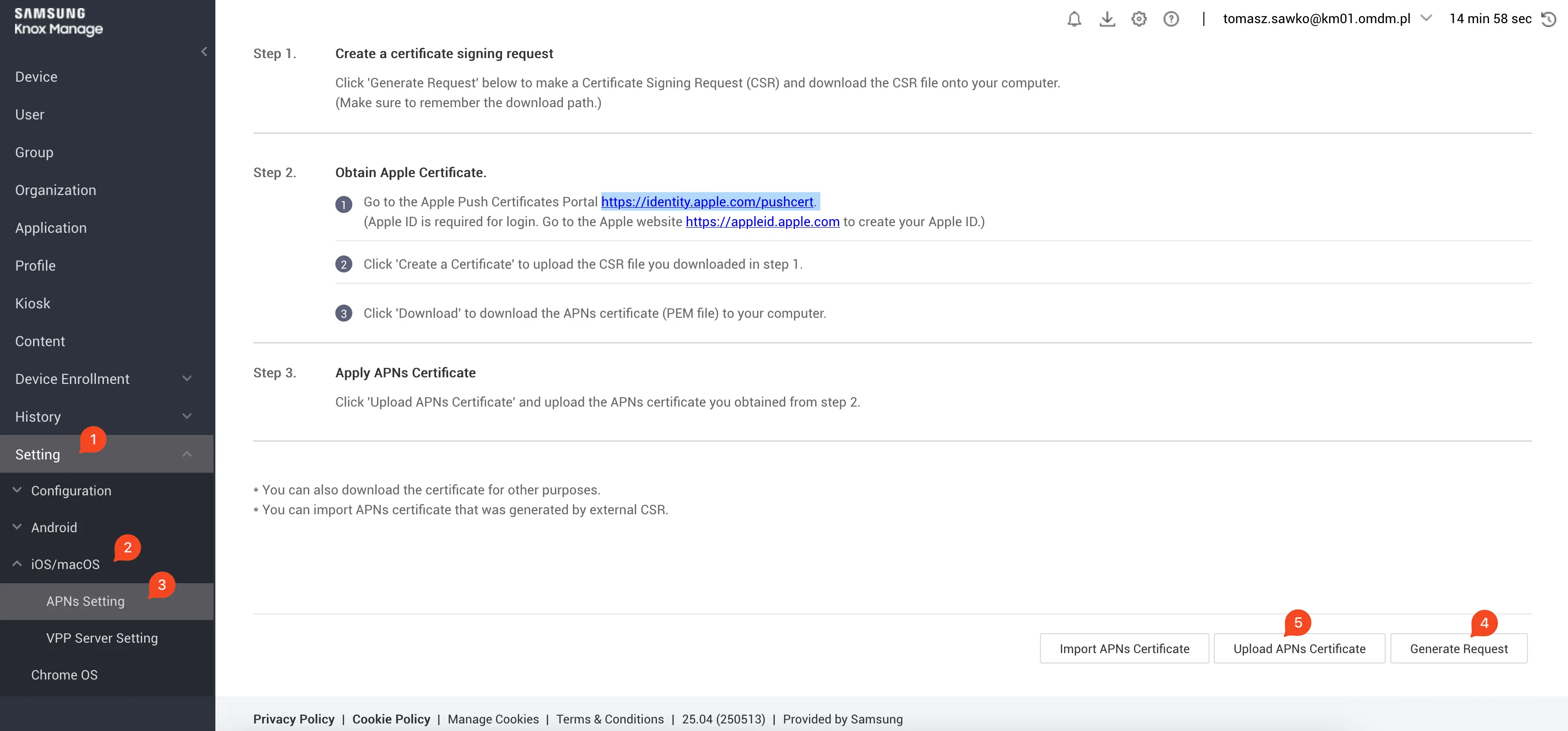
In the Knox Manage console, go to the Settings section [1]
Then select iOS/macOS [2]
Find and click APNs Setting [3]
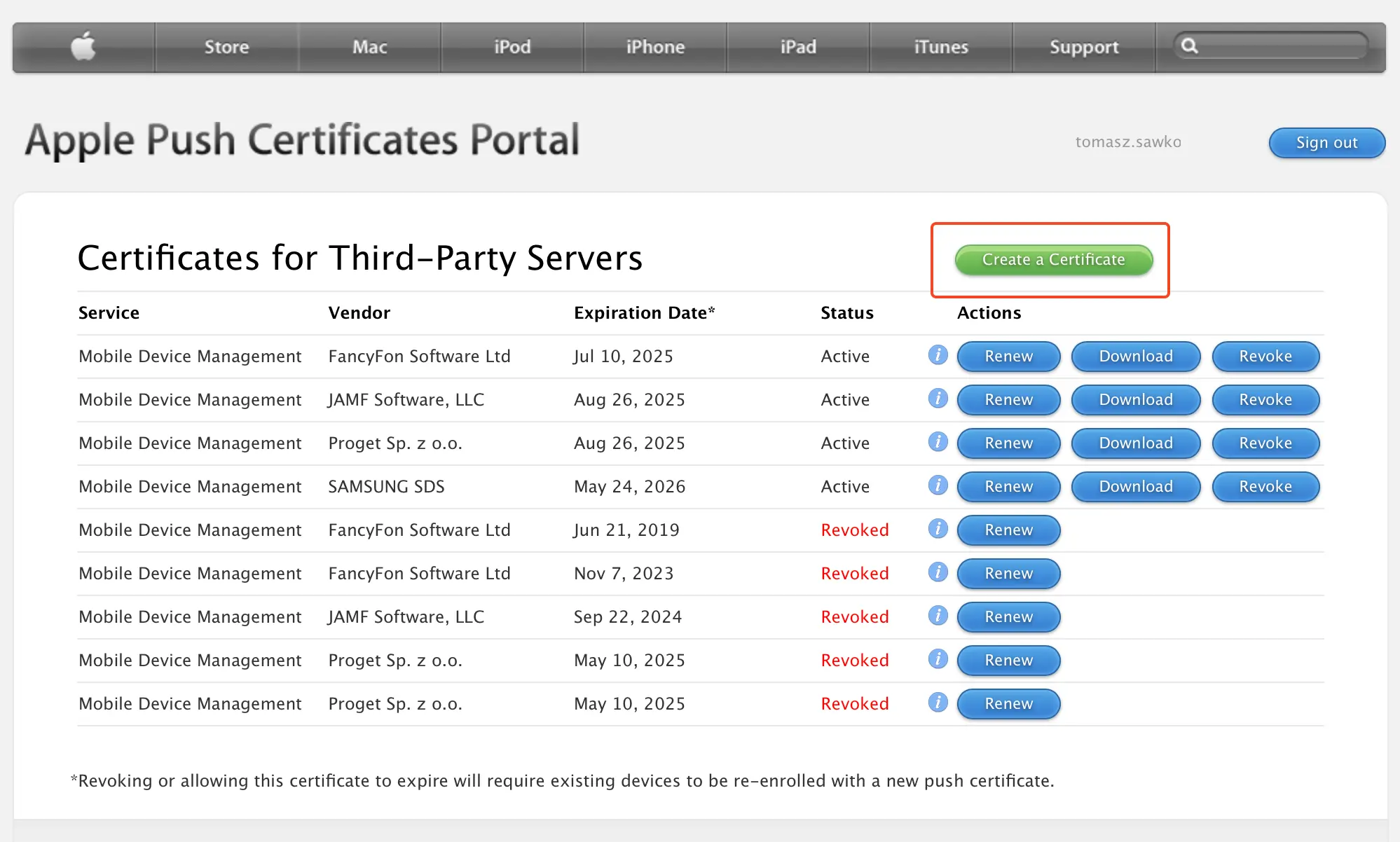
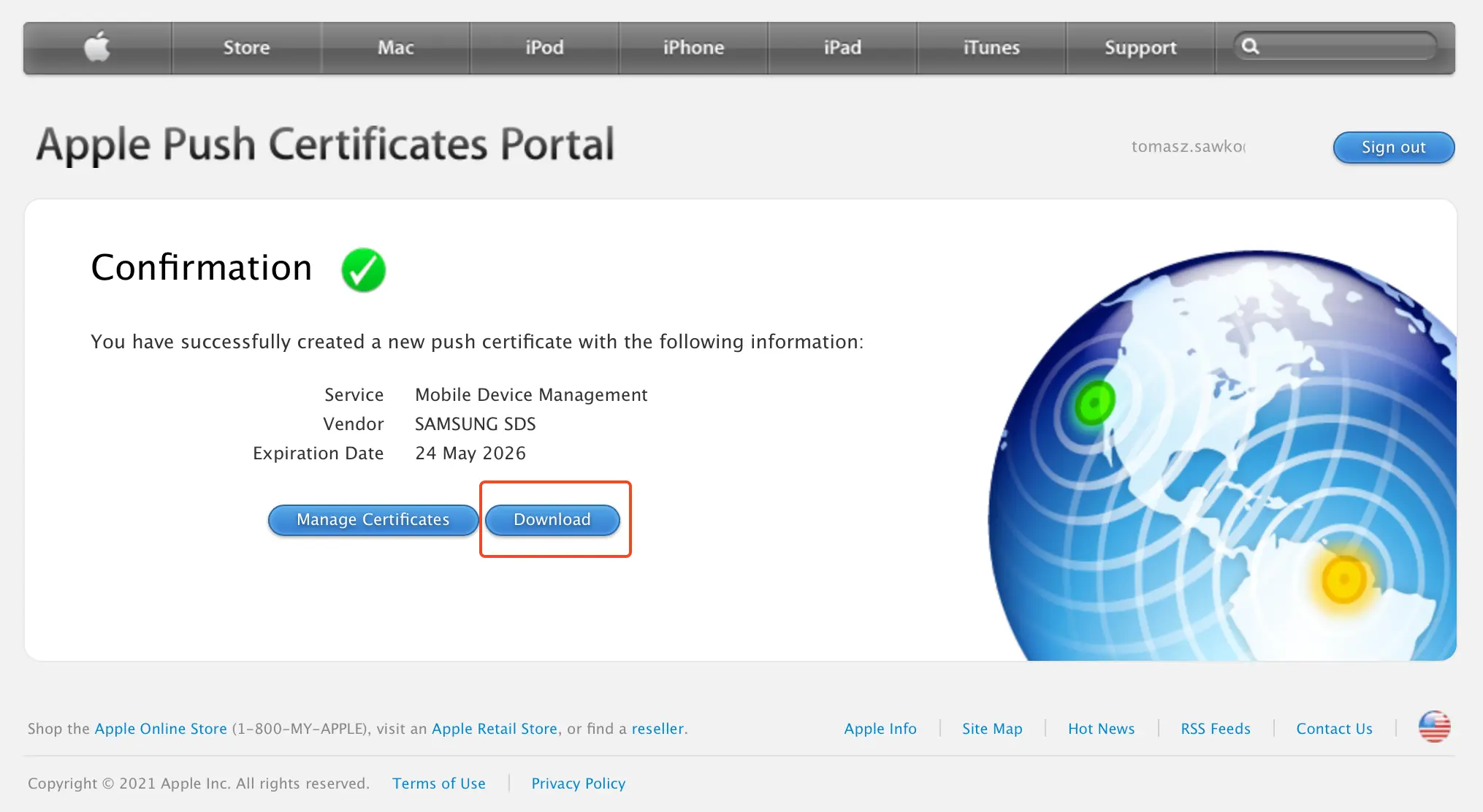
Here you’ll need to download the certificate signing request (CSR) [4] from Knox Manage, then log in to the Apple Push Certificates Portal using your Apple ID (corporate, not private – please!), generate the certificate and finally upload it back to Knox Manage [5]
Pro Tip: Remember that the APNs certificate is valid for one year. Write yourself a calendar reminder to renew it, otherwise you’ll wake up in trouble and your apples will stop listening.
Managing iOS devices in Knox Manage – welcome to the orchard!
We already have APNs, so it’s time to invite the first iPhones and iPads to our managed family. Knox Manage offers several scenarios here.
iOS device registration – how to enroll an apple in Samsung’s school?
Knox Manage, like other MDM systems, gives us a choice of how we want to „enroll” iOS devices.
User-initiated enrollment:
Ideal for BYOD (Bring Your Own Device) scenarios, where an employee uses a private iPhone for work purposes.
The process is simple: the user receives a special URL link to the Knox Manage registration portal (e.g., companyname.knoxmanage.com) and their login credentials, or alternatively scans a QR code.
Then they download the Knox Manage agent from the App Store and follow the on-screen instructions. A few clicks and done! The phone is under partial company control, according to the set policies.
Apple Automated Device Enrollment (ADE), formerly DEP:
This is the gold standard for corporate devices. If you’re buying iPhones or iPads directly from Apple or authorized resellers (such as Polish operators – Plus, Orange or T-Mobile, who often have interesting offers for business), you can use Apple Business Manager (ABM).
ABM integration with Knox Manage is a breeze:
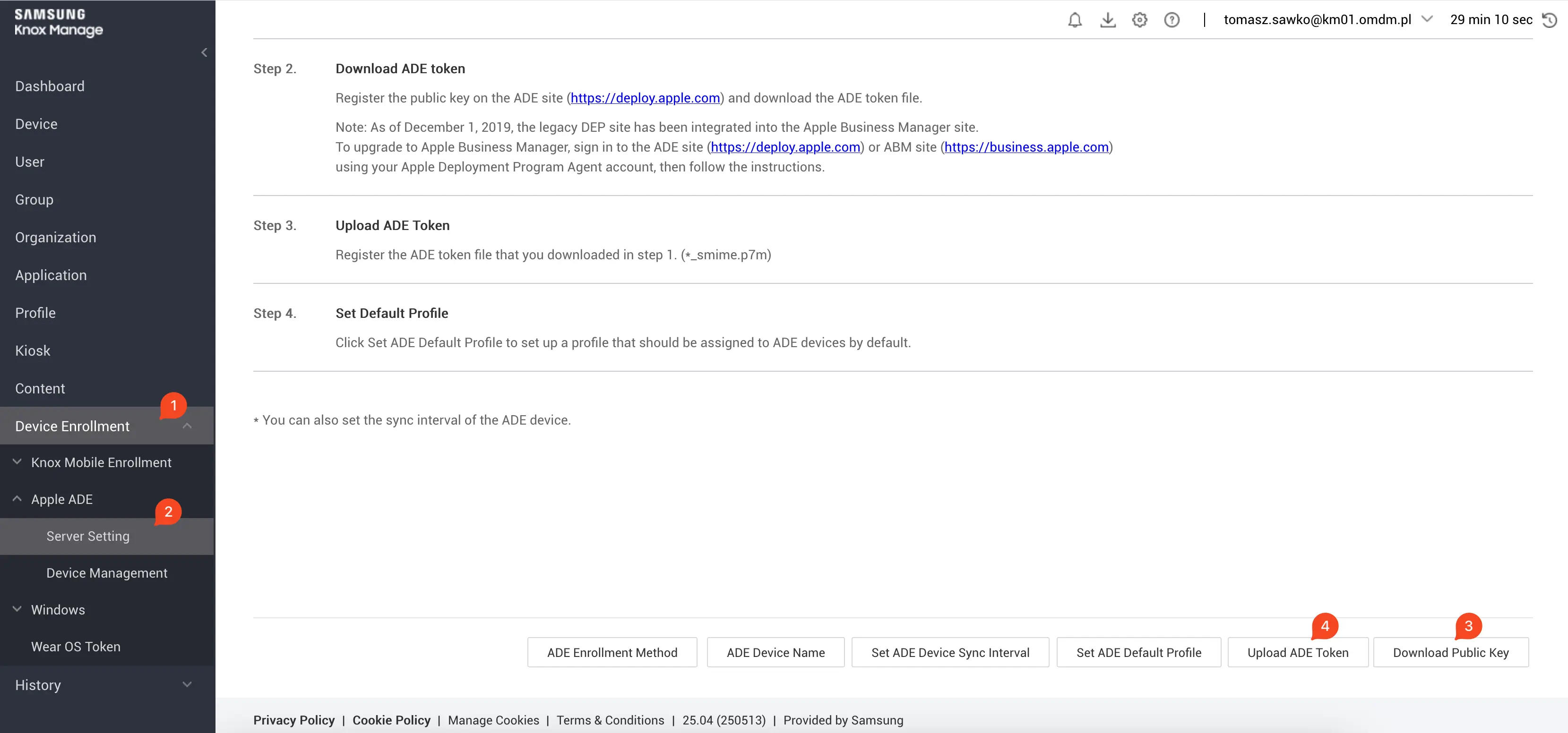
In Knox Manage, in the Device Enrollment section [1] -> Apple ADE (Automated Device Enrollment) -> Server Setting [2]
Download the MDM server public key from there [3]
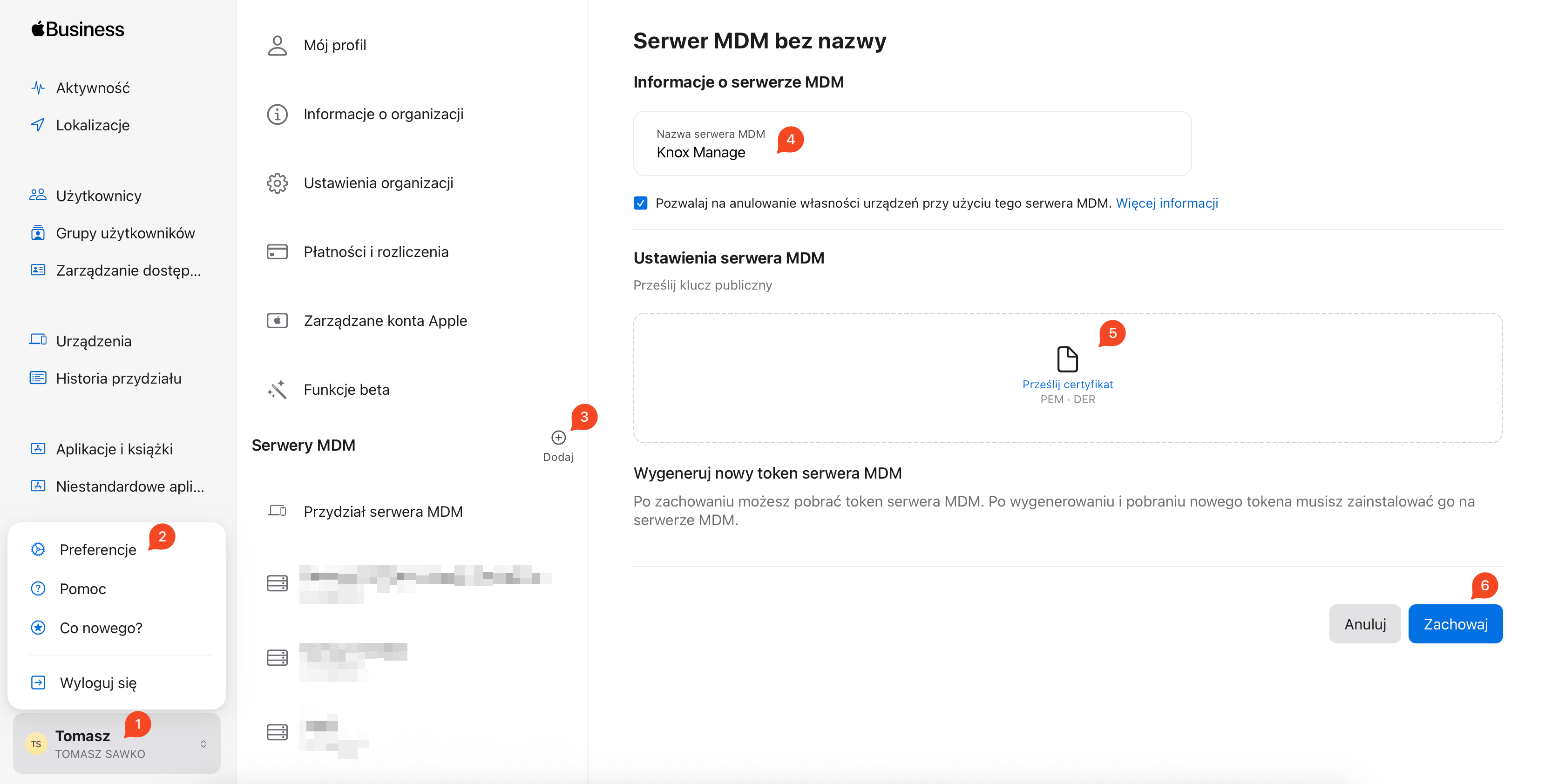
Log in to your ABM portal, create an MDM server for Knox Manage and upload the downloaded key
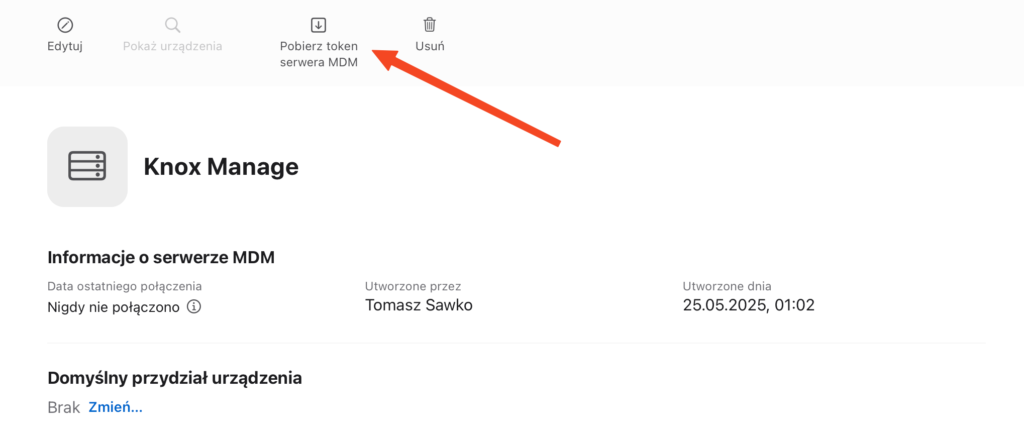
Download the server token from ABM
Return to Knox Manage and upload this token [4]. The result? Every newly purchased device assigned in ABM will automatically register in Knox Manage after first startup and internet connection. Without the administrator touching it! Magic, right? The user unpacks, turns on and immediately has everything configured as needed.
Configuration profiles for iOS – conducting the apple orchestra
We already have devices in the system, so it’s time to apply appropriate policies and configurations to them. In Knox Manage, we do this using profiles.
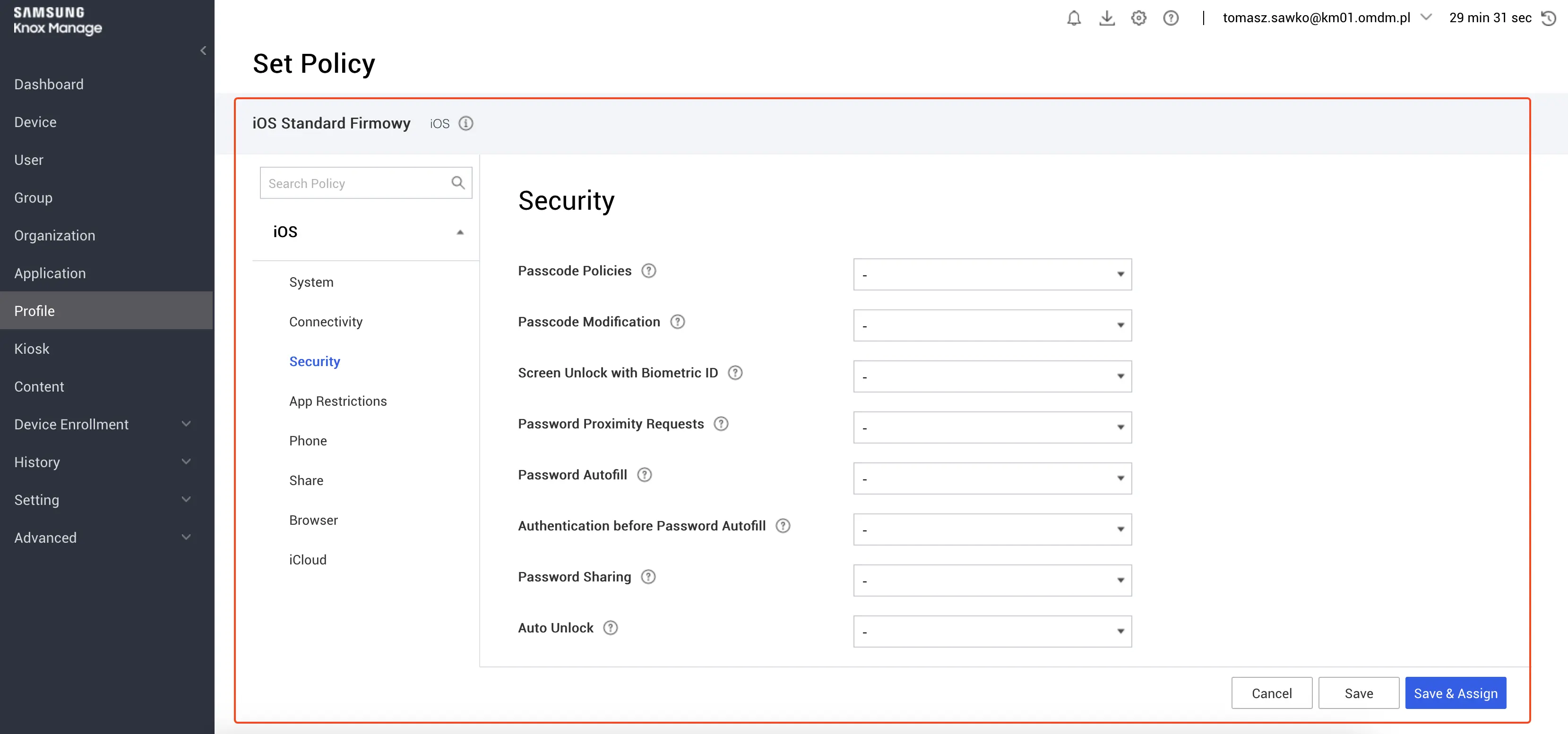
Creating an iOS profile:
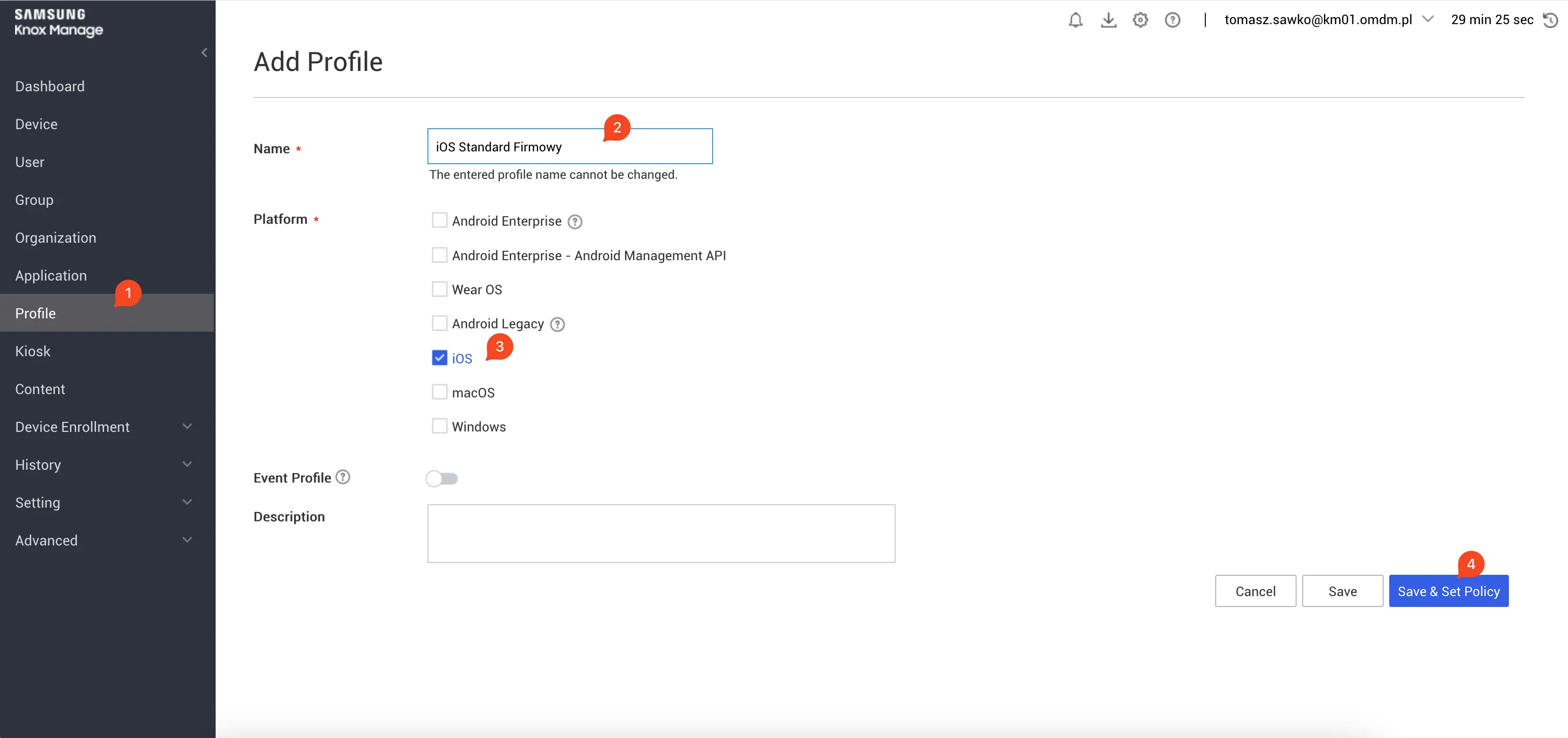
Go to the Profile section in the Knox Manage console [1]
Click Add, then select iOS Profile.
Give the profile a meaningful name, e.g., „iOS Corporate Standard” or „iOS Marketing Secure” [2]
What can we configure? Quite a lot!
Restrictions: Go wild here! Want to block the App Store so employees don’t install TikTok on their work iPad? Be my guest. Disable the camera, screenshots, AirDrop? No problem. Knox Manage gives you plenty of room to customize the device to security and productivity requirements.
Wi-Fi: Automatic configuration of access to the corporate Wi-Fi network. Just set it up once and devices will connect automatically. No more „What’s the Wi-Fi password?” questions.
Email (Exchange ActiveSync): Configure Exchange ActiveSync email accounts. The user gets the device and immediately has access to emails, calendar and contacts.
Passcode Policy: Enforce the use of strong lock screen passwords. You can define minimum length, complexity, time to automatic lock. Security basics!
App Management:
Public apps from App Store: You can remotely install (or enforce installation of) apps available in the public App Store.
Volume Purchase Program apps (VPP – now Apps and Books): If you purchase apps in volume through Apple Business Manager, you can easily distribute them to managed devices while keeping licenses in the company. Adding path: Applications -> Add -> Business (VPP).
In-house applications: If you create your own apps for employees, you can distribute them bypassing the App Store. Adding path: Applications -> Add -> In-house.
After configuring the profile, you assign it to the appropriate device or user group. And voilà! Policies start working.
Managing macOS in Knox Manage – apple on a bigger screen
The process is very similar to what we saw for iOS:
Registration: Similarly, you can use user-initiated enrollment (agent installation) or, which is recommended for corporate devices, through Apple Business Manager (ADE).
Configuration profiles: Profiles for macOS are also available, allowing management of system settings, security and applications.
Managing Windows 10/11 in Knox Manage – windows under Samsung’s control!
Alright, we’ve got the apples roughly covered. What about the other side of the barricade – Windows devices? Here Knox Manage also shows its claws, offering quite advanced capabilities.
Windows device registration – how to invite Microsoft to the Korean house?
Integration with Azure Active Directory (Azure AD) for Windows Autopilot:
This is the cherry on top for modern Windows management. If your company uses Azure AD (especially the Premium version), you can configure the so-called „out-of-the-box experience” (OOBE). The user takes the laptop out of the box, logs in with their corporate Azure AD credentials, and the device automatically registers in Knox Manage and downloads all configurations.
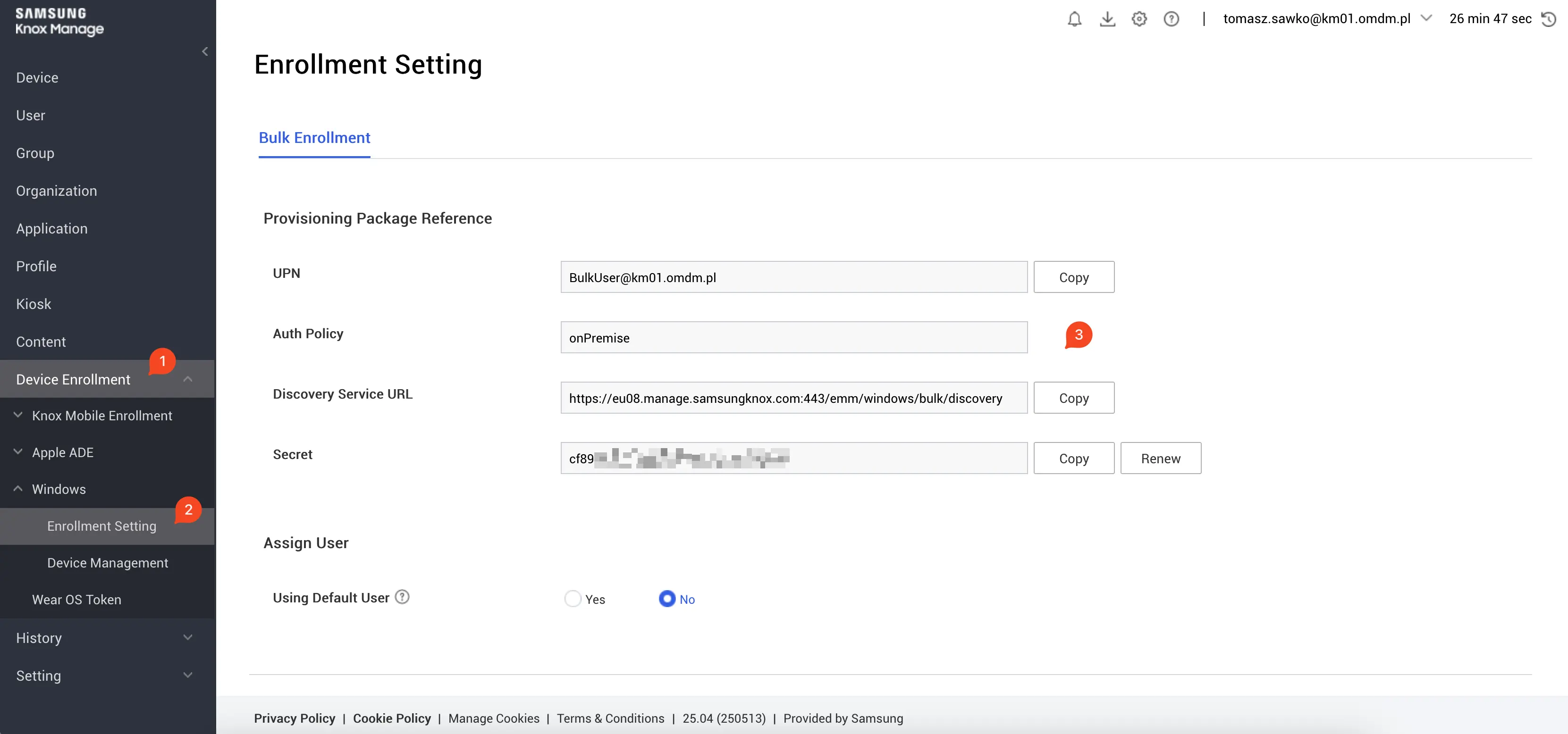
Configuration requires adding Knox Manage as an MDM application in Azure AD. In the Knox Manage console you’ll find the appropriate URLs that need to be pasted into Azure AD settings. Path in Knox Manage: Device Enrollment -> Windows -> Enrollment Settings. You also need to configure the MDM user scope in Azure AD.
Manual enrollment:
If you don’t have Azure AD Premium or for specific scenarios, the user can manually register the device.
They just need to go to the special Knox Manage portal (e.g., companyname.knoxmanage.com) using a browser on their Windows computer, log in and download the Knox Manage agent. After installing the agent, the device will appear in the console.
Bulk enrollment using provisioning package:
Great option for quickly preparing a larger number of devices without Azure AD.
You use the Windows Configuration Designer (WCD) tool to create a provisioning package (.ppkg). Knox Manage provides the script or details needed for this process. Path in Knox Manage: Device Enrollment -> Windows -> Enrollment Settings.
The ready .ppkg file can be uploaded to a USB drive, sent by email or placed on a network drive. Running it on a new computer (e.g., during initial setup) will cause automatic registration in Knox Manage.
Configuration profiles for Windows – controlling the windows
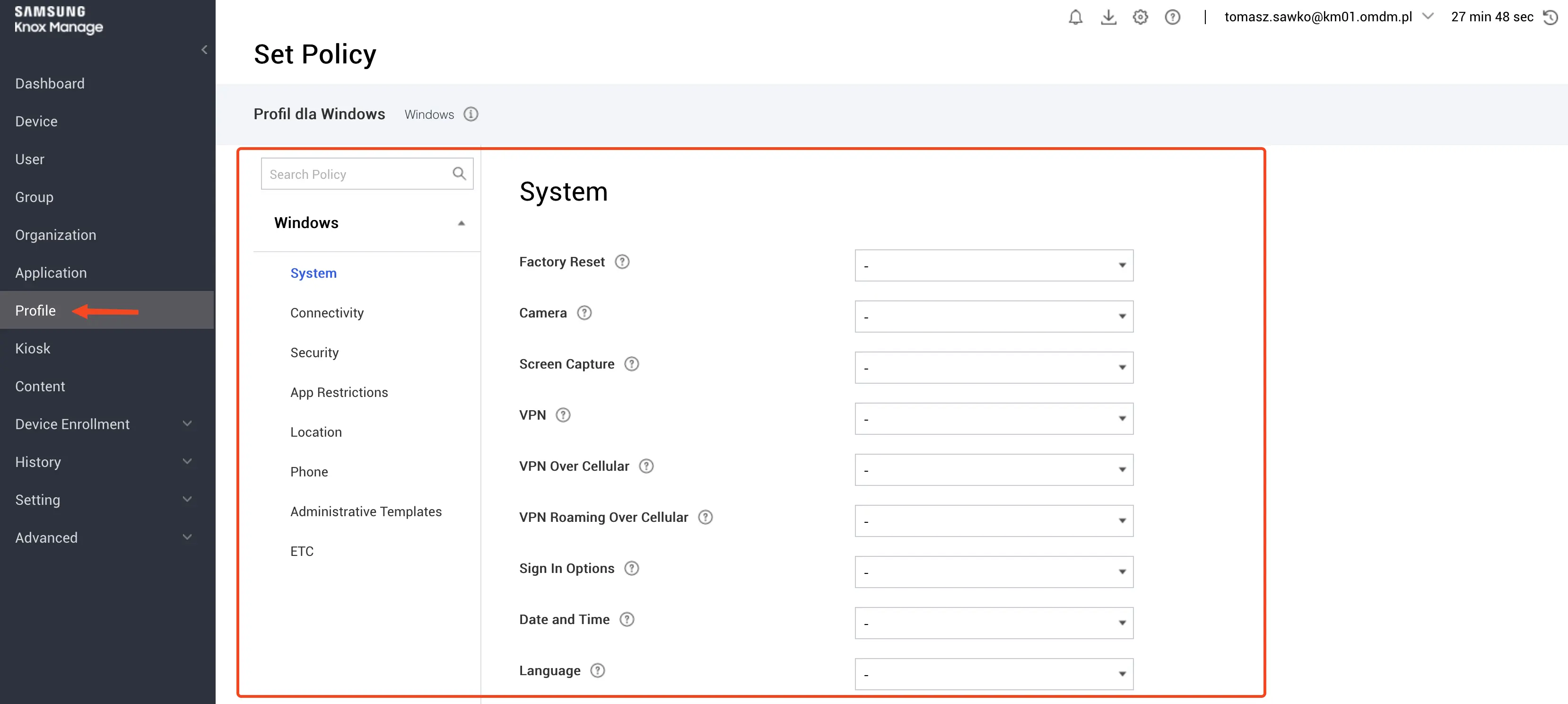
Similar to iOS, for Windows we create profiles to manage configurations and security.
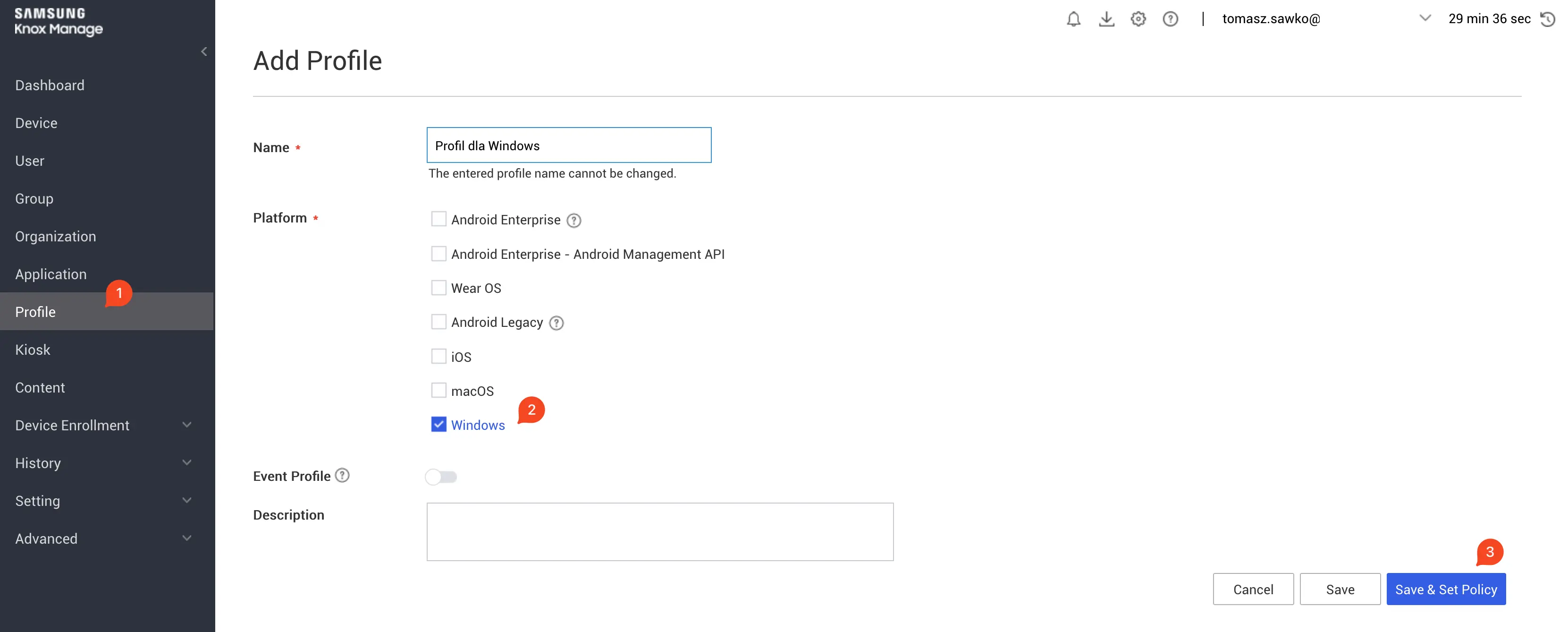
Creating a Windows profile:
In the Knox Manage console: Profiles -> Add -> Windows Profile.
What interesting things can we set here?
BitLocker encryption: You can enforce disk encryption using BitLocker and importantly – configure storage of recovery keys in Knox Manage. Priceless when a user forgets their password!
Windows Defender / Antivirus settings: Manage the built-in Windows Defender antivirus, configure scanning, definition updates.
Password Policy: Require strong login passwords, set account lockout policies.
Certificates: Distribute certificates (e.g., for Wi-Fi EAP-TLS, VPN) to managed computers.
Wi-Fi, VPN configuration: Define wireless network profiles or VPN connections.
Application Management:
MSI packages: Distribute and install traditional Windows applications in .msi format. Application adding path: Applications -> Add.
UWP (Universal Windows Platform) applications: Also manage modern apps from the Microsoft Store or your own UWP applications.
Kiosk Mode (Assigned Access): Configure a Windows device to work in kiosk mode – with one application (e.g., browser at an information desk) or with a selected set of applications.
Windows Updates management: Control how and when Windows system updates are installed. You can set active hours, defer feature or quality updates.
Device Firmware Configuration Interface (DFCI): This is a real game-changer! DFCI allows managing UEFI/BIOS settings from the MDM level. Imagine being able to remotely disable the camera, microphone, USB ports or change boot order at the firmware level! Samsung strongly emphasized this functionality as a differentiator.
Remote actions for Windows – Administrator’s magic tricks
Knox Manage allows executing remote commands on managed Windows computers. Available actions include:
Wipe: Remote factory reset of the device (useful in case of loss or theft).
Lock: Remote device lock.
Restart: Remote restart.
File Deployment: Ability to send files to the device.
Script Execution: Running your own scripts (e.g., PowerShell) on devices.
Licensing and support – Where to get Knox?
Knox Manage is part of a larger package called Knox Suite, which also includes other interesting tools. When it comes to licenses and technical support, it’s worth contacting Samsung directly or their authorized partners. In Poland, many mobile operators, such as Plus, Orange or T-Mobile, offer MDM solutions and can help select appropriate licenses and provide support.
Summary – Knox Manage doesn’t just stand by Android!
As you can see, Samsung Knox Manage is not just a tool for managing Galaxy smartphones. It’s quite a competent UEM (Unified Endpoint Management) platform that allows you to take control of devices with iOS, macOS and Windows as well. Of course, like any solution, it has its stronger and weaker sides compared to dedicated systems for a given platform (e.g., Jamf for Apple or Intune for Windows), but as part of the integrated Knox Suite package, it offers a consistent environment for managing a diverse device fleet.
And once you’ve mastered all the integrations in Knox Manage, get interested in the topic of Zero Trust 😉
Podając swój adres e-mail wyrażasz zgodę na przetwarzanie Twoich danych przez serwis follow.it. Zapoznaj się z Regulaminem oraz Polityką Prywatności serwisu.
🇵🇱 Przejdź do polskiej wersji tego wpisu / Go to polish version of this post Step by step: Configuring Conditional Access in Azure AD and Compliance Policies in Intune Hi! Today...
🇵🇱 Przejdź do polskiej wersji tego wpisu / Go to polish version of this post Introduction – what is this whole „Zero Touch” thing? Sit back comfortably, because...







 Follow.it