Analizy
Knox Suite
Base, Essentials, Enterprise — który plan dla jakiej firmy

filtruj po kategorii
Filtruj po autorze

Base, Essentials, Enterprise — który plan dla jakiej firmy
Apple pozamiatało! Migracja MDM, logowanie iPhonem i inne nowości

Nowe narzędzia w rękach administratora MDM
Czyli Samsung stworzył narzędzie MDM, które mówi płynnie w trzech językach

Kompleksowy przewodnik, który zaoszczędzi Ci dziesiątki godzin
MDM - o zarządzaniu urządzeniami w organizacji
Zabezpiecz Office 365 wymagając zgodnych urządzeń!

Dogłębna analiza dla małych, średnich, dużych przedsiębiorstw i sektora publicznego (2024/2025)
Jak EMM/MDM wpisuje się w nowoczesną architekturę bezpieczeństwa

🇵🇱 Przejdź do polskiej wersji tego wpisu / Go to polish version of this post
Hi! Today we’re tackling a topic that’s already got a long beard, but in my opinion it’s still worth examining. It’s a topic that since January 2025 has been keeping everyone awake at night who’s trying to buy a Samsung Knox license. Samsung decided to restructure Knox Suite from one monolithic package into three (and in some markets four) separate plans: Base, Essentials, and Enterprise, with an optional Companion Plan for companies with their own UEM.
Sounds like tidying up the offering? That’s probably how it looked in the presentation in Seoul. From the perspective of an admin who needs to justify license selection in the IT budget, it mainly raises questions. Which plan is enough for a 50-person trading company? What does Enterprise offer beyond Essentials? Does Companion make sense if I’m already paying for Intune? And finally — how much does it cost in the Polish market?
I’m breaking down each plan into its components, comparing them according to the same criteria, and providing specific recommendations for different types of organizations. Everything based on official Samsung documentation, press releases, and my experience with client implementations in Poland.
Let’s go!

Until the end of 2024, Knox Suite was one product. You bought a Knox Suite license and got the full package: KPE, KME, Knox Manage, Knox E-FOTA, Knox Asset Intelligence, Knox Capture, and Knox Configure. For a company with 500 devices and a dedicated IT department, this made sense. For a company with 30 phones that only needed enrollment and basic management? It was like buying a combine harvester to mow a small lawn.
Samsung announced the change on January 10, 2025, as part of Samsung Global Newsroom. The official justification sounded beautiful: “cater to the diverse security and device management needs of businesses of all sizes.” In practice, Samsung observed the same thing I see with my clients — most companies with fleets below 200 devices weren’t using half the components of the old Knox Suite, but were paying for everything.
And here’s a slight hiccup in communication. In the American market, Samsung offers four plans (Base, Companion, Essentials, Enterprise). In international markets — including Poland — official communication speaks of three (Base, Essentials, Enterprise). Companion Plan is a variation of Enterprise without Knox Manage, intended for companies with their own UEM. I’ll discuss it separately, because it’s a very important option for the Polish market, where Intune, Essentials MDM, Proget MDM, or Workspace ONE dominate.
Before I compare the plans, I need to explain what the individual components do. Samsung’s naming can give you a headache, because some products have overlapping functions, and the boundaries between them aren’t always obvious.
A security layer operating at the device level. KPE doesn’t have its own administrative console — it’s a set of APIs and policies that are enforced by your MDM/UEM system (Knox Manage, Intune, Essentials MDM, or another). KPE provides access to advanced Samsung features unattainable through standard Android Enterprise APIs: Galaxy AI control, DualDAR, Knox Vault integration, advanced network policies, DeX configuration, and many others.
Since July 2021, the KPE Premium license has been free. This is a significant decision by Samsung that removed the cost barrier to accessing advanced security policies. The exceptions are DualDAR and Universal Credential Management (UCM) — these still require separate, paid licenses.
KPE works through Knox Service Plugin (KSP) — an OEMConfig application that is the mechanism for delivering KPE policies to the device. KSP is available in Google Play and works with any UEM that supports OEMConfig. This means that even companies using Intune can apply the full range of KPE policies without Knox Manage.
The equivalent of Apple Business Manager (ABM) for the Samsung ecosystem. KME allows you to automatically register devices in the MDM/UEM system right after first startup, without manual configuration. The administrator adds devices to the KME portal (manually, via CSV upload, or automatically through a reseller), assigns them to an MDM server, and each device after turning on automatically registers and receives policies.
KME works with any compatible UEM — not just Knox Manage. The list of supported systems includes Essentials MDM, Proget MDM, Intune, Workspace ONE, MobileIron, SOTI, and others. This is important because KME is part of the free Base plan and can be used with any UEM at no additional cost.
Samsung’s own EMM/UEM system. Knox Manage is a full-fledged device management console — registration, profiles, policies, applications, geolocation, kiosk mode, remote wipe, reports. Knox Manage supports not only Android/Samsung, but also iOS, Windows, macOS, Chrome OS, and Wear OS (which I wrote about in a separate article). It’s validated by Google as Android Enterprise Recommended and Chrome Enterprise Recommended.
Knox Manage is the only Knox Suite component that is a complete device management system. The remaining components (KPE, KME, E-FOTA, Asset Intelligence, Capture, Authentication Manager) are specialized tools that complement UEM functionality — whether Knox Manage or an external system.
A tool for remote viewing and control of the device screen. The administrator can see the user’s device screen and control it remotely. Particularly useful in frontline environments where users aren’t technical and can’t follow helpdesk instructions themselves. From my experience — it turns a 20-minute phone conversation full of “now please swipe down, no, not there, higher…” into a 3-minute intervention.
Enterprise Firmware Over-The-Air. Allows the administrator to control the firmware (operating system) version on devices. You can enforce a specific version, block updates, schedule rollout for a specific date, test new firmware before deploying to the entire fleet. Without E-FOTA, the administrator has no control over when and what update reaches devices — Samsung pushes OTA according to its own schedule.
My advice: E-FOTA is one of the most underrated Knox Suite components. Companies that don’t use it discover its value only after an automatic Android update breaks compatibility with a critical business application on 300 devices at once. I once saw a situation where an Android 14 update broke integration with a Zebra scanner at a logistics client. If they had E-FOTA, they would simply have held back the update until a patch was available. Instead, they had a week of downtime.
A cloud analytics platform that collects data on device usage: battery status, data consumption, app usage, network health, security anomalies. Data is presented in the form of dashboards and reports. Samsung is also developing Knox Asset Intelligence integration with Microsoft Sentinel (SIEM), which allows correlating data from mobile devices with the broader security context of the organization.
Turns the Samsung Galaxy camera into an enterprise-class barcode scanner. Supports 1D and 2D formats, integrates with business applications through Android intents, and eliminates the need to purchase dedicated scanners. A niche component, but in logistics, warehouses, and retail it can save hundreds of złoty per device.
Automates login on devices shared by multiple users (shared devices). Uses facial recognition to identify the user and automatically log into applications. Useful in shift environments — hospitals, factories, warehouses — where one device passes from hand to hand.
Okay, after this introduction, time for specifics. Here’s what you get in each plan:
| Component | Base | Essentials | Companion | Enterprise |
|---|---|---|---|---|
| Knox Platform for Enterprise | ✓ | ✓ | ✓ | ✓ |
| Knox Mobile Enrollment | ✓ | ✓ | ✓ | ✓ |
| Knox Manage | — | ✓ | — | ✓ |
| Knox Remote Support | — | ✓ | ✓ | ✓ |
| Knox E-FOTA | — | — | ✓ | ✓ |
| Knox Asset Intelligence | — | — | ✓ | ✓ |
| Knox Capture | — | — | ✓ | ✓ |
| Knox Authentication Manager | — | — | ✓ | ✓ |
| Price | 0 PLN | Paid | Paid | Paid |
The key difference between Companion and Enterprise: Companion doesn’t include Knox Manage. It’s intended explicitly for companies that already have their own UEM (Intune, Essentials MDM, Proget MDM, etc.) and don’t want (or can’t) replace it with Knox Manage. Enterprise includes Knox Manage and everything else.
And here it starts getting uphill. Samsung doesn’t publish Knox Suite pricing on its website. The official position is: “Pricing depends on several factors, including the selected plan, your location, and number of licenses or products purchased. For details, we recommend contacting the Samsung Knox sales team or your local official reseller.”
In a world where Microsoft publishes Intune prices to the cent, and Jamf has transparent pricing on its website, Samsung still forces you to contact a reseller. I understand the distribution model is different (Samsung sells through partners, not directly), but the lack of even approximate price ranges on the product page makes budget planning and offer comparison difficult.
I can provide approximate ranges based on publicly available MSRP pricing (Samsung published them for the American market) and my experience with the Polish market:
| Plan | Approximate price (USD MSRP) | License model | Period |
|---|---|---|---|
| Base | 0 USD | Included with device | Device lifetime |
| Essentials | ~24 USD/device/year | Per device, per year | 1, 2, or 3 years |
| Companion | Contact reseller | Per device, per year | 1, 2, or 3 years |
| Enterprise | ~36-48 USD/device/year | Per device, per year | 1, 2, or 3 years |
MSRP prices for Essentials and Enterprise plans are estimates based on historical Samsung pricing (Knox Manage was priced at ~24 USD/device/year MSRP in 2020, full Knox Suite — correspondingly more). Samsung hasn’t published an updated MSRP price list after splitting into plans. In the Polish market, prices in PLN are set by authorized resellers and may differ from MSRP.
VERY IMPORTANT: I don’t have access to current Samsung Knox Suite pricing for the Polish market and don’t want to provide specific amounts in PLN that I can’t verify. For current prices, you should contact Polish Samsung Knox resellers — among them is the Plus operator, which serves as an authorized Samsung partner in the Polish market.
There’s one more important cost exception: Galaxy Enterprise Edition. Samsung offers devices in the Enterprise Edition variant (e.g., Galaxy S25 Enterprise Edition, Galaxy A55 Enterprise Edition), which are identical hardware-wise to consumer versions but have a one-year Knox Suite Enterprise Plan license included at no additional charge. In the UK, Samsung specifies that the Enterprise license is included “at no additional cost when a one-, two-, or three-year Knox Suite license is purchased.” This effectively means that when purchasing Enterprise Edition devices, the Enterprise license cost is included in the device price.
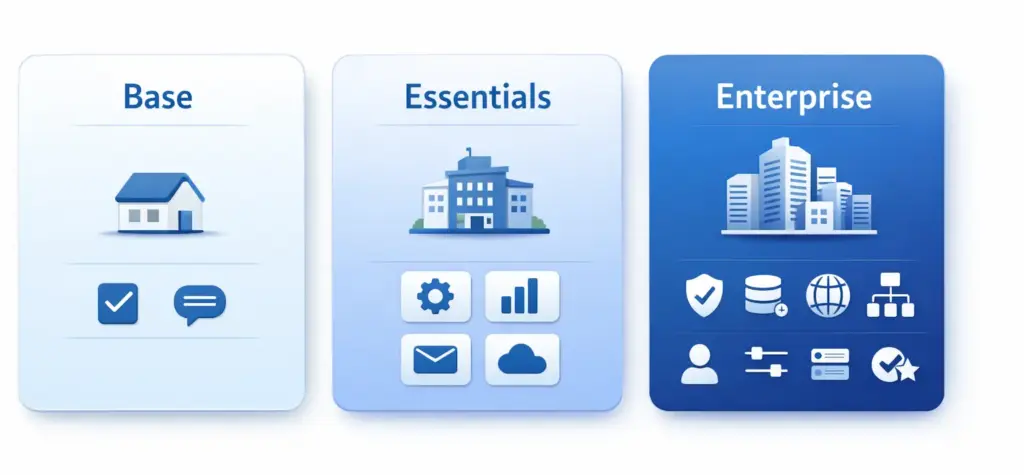
The Base plan is free and included with every purchased Galaxy device. It includes two components: Knox Platform for Enterprise (KPE) and Knox Mobile Enrollment (KME). This sounds modest, but in practice provides surprisingly many capabilities.
KME allows automatic device registration in any compatible UEM. If your company uses Intune, Workspace ONE, Proget MDM, TechStep Essentials MDM, or another system, you can use KME for zero-touch enrollment at no additional cost. It’s the equivalent of Apple Business Manager that Samsung provides for free.
KPE with a free Premium license provides access to over 300 advanced policies through Knox Service Plugin. This includes Galaxy AI control, advanced network policies (firewall, VPN, Wi-Fi), DeX configuration, SIM/eSIM management, DualDAR (paid addon), and many others. These policies work through OEMConfig in any UEM — Knox Manage isn’t needed.
For whom: Every company using Samsungs for business purposes. There’s no reason not to use Base — it’s free and requires no commitments. Even if a company has 10 phones and manages them through Intune, KME saves time with every new device, and KPE/KSP provides access to policies unavailable through standard Android Enterprise.
What’s missing: Its own MDM console. Base doesn’t include Knox Manage, Remote Support, or any analytical tools. If a company doesn’t yet have any MDM/UEM system, the Base plan alone isn’t enough to manage devices — it’s just a “layer zero” that requires a UEM above it.
Essentials adds two components to Base: Knox Manage and Knox Remote Support. This makes it a complete MDM/EMM solution — a company buying Essentials doesn’t need any other system to manage devices.
Knox Manage under Essentials supports multiple platforms: Android, iOS, Windows, macOS, Chrome OS, iPadOS, and Wear OS. This means a company with a mixed environment (e.g., Samsungs for sales staff, iPads for management, Windows laptops for the office) can manage everything from one console. Cross-platform support isn’t as deep as in Intune or Essentials MDM (especially on the Windows and macOS side), but for most SMB scenarios it’s sufficient.
Knox Remote Support is a tool whose value is proportional to users’ technical proficiency. In a software company where every employee can operate their phone, Remote Support is a nice addition. In a retail chain where a salesperson calls IT because “the phone isn’t working again”? Remote Support is a game changer.
For whom: SMBs and medium-sized companies (20–500 devices) that don’t yet have an MDM/UEM system or are looking for a cheaper alternative to Intune/Workspace ONE. Companies with a large number of non-technical users (retail, logistics, hospitality) who will benefit from Remote Support. Companies primarily buying Samsungs who want a system optimized for Galaxy.
What’s missing: Firmware control (E-FOTA), analytics (Asset Intelligence), barcode scanning (Capture), and authentication on shared devices (Authentication Manager). These missing elements are niche, but in specific industries they can be critical.
Companion Plan is Enterprise without Knox Manage. It includes: KPE, KME, Knox Remote Support, Knox E-FOTA, Knox Asset Intelligence, Knox Capture, and Knox Authentication Manager. It’s explicitly intended for companies that already have their own UEM and don’t want (or can’t) replace it with Knox Manage.
In my opinion, this is the most underrated plan in the entire Knox Suite offering, and at the same time the one that (in my opinion) would be most important for the Polish corporate market. Why? Because most large Polish companies use Intune, Essentials MDM, or Proget MDM as their main UEM. These companies won’t replace their UEM with Knox Manage — but they may want E-FOTA for update control, Asset Intelligence for analytics, or Capture for scanning.
Companion gives them access to these tools without conflict with existing MDM infrastructure. KPE/KSP works through Intune as OEMConfig. KME works in parallel with Android Zero-Touch Enrollment (you can use both). E-FOTA and Asset Intelligence work independently of which UEM is installed on the device.
For whom: Companies with 200+ Samsung devices already using Intune, Workspace ONE, Essentials MDM, or another UEM. Companies in regulated environments that need firmware control (E-FOTA). Companies in logistics/retail that want Capture and Authentication Manager without giving up their own UEM.
Pro Tip: Companion Plan is officially communicated in the American market. In international markets it may be available under a different name or as a custom configuration — ask your reseller about the possibility of purchasing an Enterprise plan without Knox Manage. From my experience — Samsung is flexible here, but you need to know what to ask for.
Enterprise is the sum of everything: KPE, KME, Knox Manage, Knox Remote Support, Knox E-FOTA, Knox Asset Intelligence, Knox Capture, and Knox Authentication Manager. A complete platform for managing a Samsung Galaxy fleet from the beginning to the end of device life.
Enterprise makes sense in two scenarios. First: the company is “all-Samsung” and wants one system for everything — MDM, firmware, analytics, scanning. It doesn’t want to pay for Intune and doesn’t need to manage Apple or Windows devices. Second: the company buys Galaxy Enterprise Edition devices, which have a one-year Enterprise Plan license included — then the cost is zero or marginal.
For whom: Companies with 500+ Samsung Galaxy devices without an existing UEM. Companies buying Galaxy Enterprise Edition (one-year Enterprise license included in price). Companies with large frontline fleets: logistics, transportation, retail, healthcare. Companies that need full firmware control and can’t afford unplanned OS updates.
What it doesn’t do: Doesn’t fully replace Intune/Workspace ONE/Essentials MDM in managing Apple and Windows devices. Knox Manage supports iOS and Windows, but the depth of integration is less than in native solutions (Intune for Windows, Jamf for macOS). A company with a 50/50 mixed Samsung/iPhone environment will have to either accept compromises on the iOS side or maintain two MDM systems.
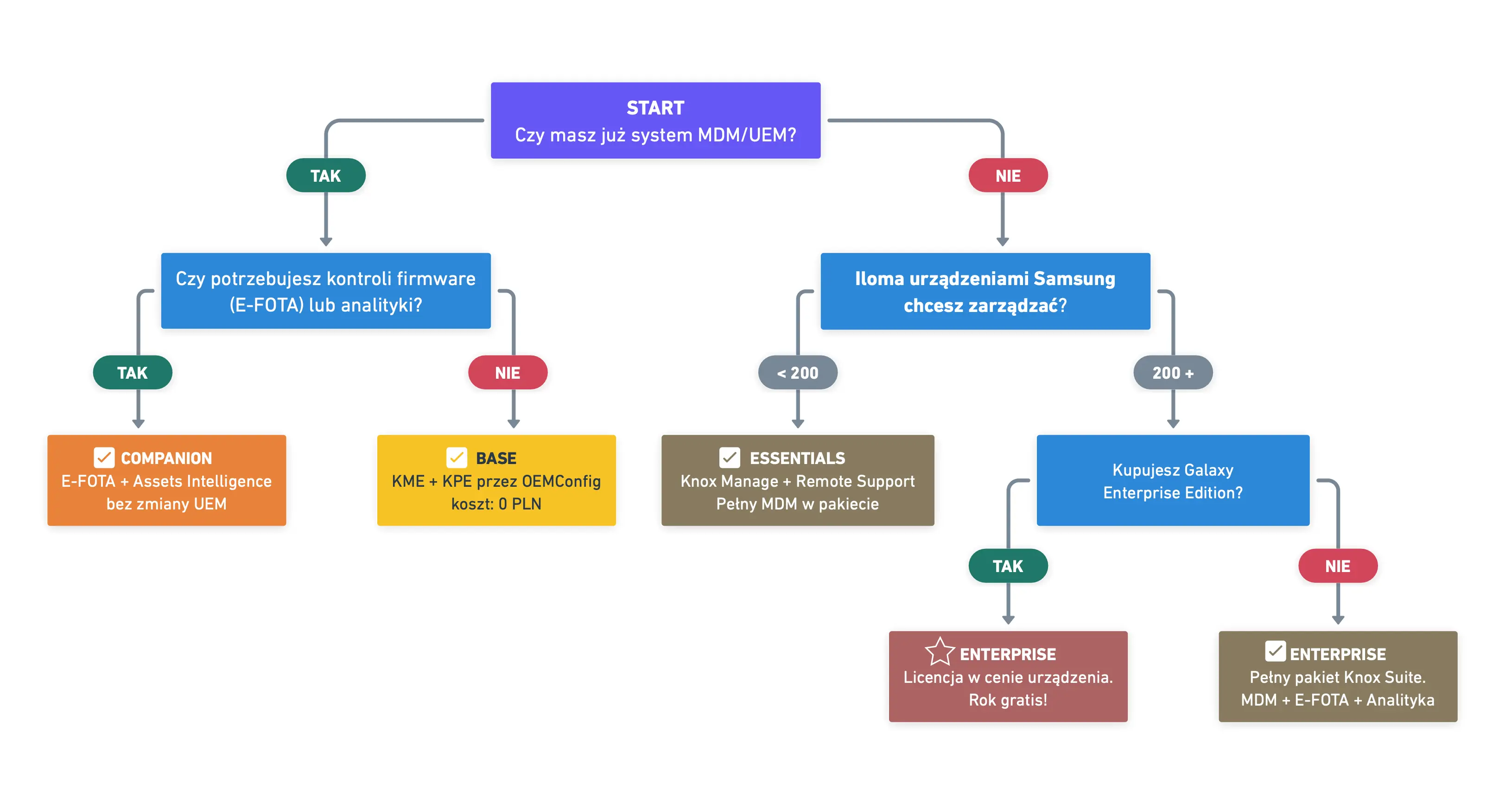
| Situation | Recommendation | Justification |
|---|---|---|
| I have Intune / Essentials MDM / Proget, buying Samsungs, only want enrollment and KPE policies | Base | KME + KPE/KSP through OEMConfig are sufficient. Cost: 0 PLN |
| Small company, 20-100 Samsung phones, no MDM | Essentials | Knox Manage provides full MDM. Remote Support facilitates support. |
| I have Intune / Essentials MDM / Proget, 300+ Samsungs, need firmware control and analytics | Companion | E-FOTA + Asset Intelligence without duplicating UEM. |
| Retail chain, 500+ Samsung devices, kiosk, barcode scanning | Enterprise | Knox Manage kiosk + Capture + Auth Manager. |
| Buying Galaxy Enterprise Edition | Enterprise (included) | One-year Enterprise license included with device. |
| Mixed fleet: Samsungs + iPhone + Windows laptops | Base + Intune/WS1 | Intune manages everything, KPE/KME adds Samsung policies. |
| Company with Intune / Essentials MDM / Proget wants to add E-FOTA but doesn’t need the rest | E-FOTA standalone | Standalone licenses still available — no need to buy a plan. |
Samsung hasn’t withdrawn the ability to purchase licenses for individual products separately. The licensing documentation states explicitly: “Standalone licenses are also available if you only want to use individual services” and “you can replace certain standalone licenses with a Knox Suite Plan at any time. The reverse also applies.”
This means a company needing only Knox E-FOTA doesn’t have to buy the entire Companion or Enterprise plan. It can buy just the E-FOTA license from a reseller. Similarly — if the only needed component is Knox Manage, a standalone license may be cheaper than the Essentials plan.
In practice, however, the Essentials plan often works out cheaper than Knox Manage standalone + Knox Remote Support standalone purchased separately. Samsung consciously prices packages more attractively than the sum of components — this is a standard bundling strategy.
My advice: Always ask the reseller for a quote for both variants (plan vs. standalone) and compare. In the Polish market, the Plus operator, as a certified Samsung Knox partner, can prepare both offers and help choose the optimal licensing configuration.
Splitting Knox Suite into plans is a step in the right direction, but it’s not without problems.
First — lack of public pricing. I’ve already mentioned this, but I’ll repeat it because it’s really frustrating. In the age of SaaS pricing, where every vendor displays prices on their website, Samsung still makes you call a reseller. I understand the distribution model, but the lack of even approximate ranges makes budget planning difficult.
Second — Companion Plan is poorly communicated outside the USA. On Samsung Knox pages for European markets, there’s talk of three plans (Base, Essentials, Enterprise), and Companion appears mainly in American materials. This is strange because Companion is the most sensible plan for corporate companies with existing UEM — and there are plenty of such companies in Europe.
Third — naming. “Base,” “Essentials,” “Enterprise” are names that say nothing about content. Knox Suite — Manage, Knox Suite — Full, Knox Suite — Add-on would be much more descriptive. But these are complaints for the marketing department, which — I assume — had its reasons.
Splitting Knox Suite into plans solves a real problem. For years, Samsung forced small companies to buy the full package, half of which they didn’t use. Now a company with 50 phones can buy Essentials and get exactly what it needs: MDM, enrollment, and remote support. A company with Intune can stay with the free Base and only pay extra for E-FOTA if needed.
At the same time, Samsung should better communicate the value of the free Base plan. Many corporate companies I talk to don’t know that KPE Premium has been free since 2021. They don’t know that KME allows zero-touch enrollment in Intune at no cost. They don’t know that Knox Service Plugin provides access to over 300 Samsung policies (including Galaxy AI control) through OEMConfig. This information is in the documentation, but doesn’t reach administrators’ awareness.
In the Polish market, it’s worth considering Knox Suite in the context of alternatives. Proget MDM and TechStep Essentials MDM — both available through Plus — are full MDM systems working with any device manufacturer, not just Samsung. If a company has a mixed fleet (Samsung + Motorola + Xiaomi), Knox Manage isn’t the optimal choice because its advanced features work mainly on Galaxy. In such a scenario, a better approach is multi-platform MDM (Proget MDM, Essentials MDM, Intune) + free Knox Base for Samsungs.
1. Samsung Global Newsroom: Knox Suite Now Available in Scalable Packages (10.01.2025) https://news.samsung.com/global/knox-suite-now-available-in-scalable-packages-supporting-enterprises-of-all-sizes-and-industries
2. Samsung Newsroom US: Knox Suite Now Available in Scalable Packages (15.01.2025) https://news.samsung.com/us/knox-suite-now-available-scalable-packages-supporting-enterprises-all-sizes-and-industries/
3. Samsung Knox Blog: Introducing the new Knox Suite Plans https://www.samsungknox.com/en/blog/new-knox-suite-plans
4. Samsung Business Insights: Boost your business performance with Knox Suite Plans (24.03.2025) https://insights.samsung.com/2025/03/24/boost-your-business-performance-with-samsung-knox-suite-plans/
5. Samsung Business Insights: Knox Suite Companion Plan (25.03.2025) https://insights.samsung.com/2025/03/25/knox-suite-companion-plan-take-your-galaxy-devices-to-the-next-level/
6. Samsung Business Insights: Knox Suite Enterprise Plan (25.03.2025) https://insights.samsung.com/2025/03/25/knox-suite-enterprise-plan-full-control-enterprise-mobility-management/
7. Samsung Business Insights: Knox Suite Essentials Plan (25.03.2025) https://insights.samsung.com/2025/03/25/business-growth-made-easier-the-samsung-knox-suite-essentials-plan/
8. Samsung Knox Documentation: Knox licenses https://docs.samsungknox.com/admin/fundamentals/knox-licenses/
9. Samsung Knox Blog: Knox Platform for Enterprise free for customers (2021) https://www.samsungknox.com/en/blog/knox-platform-for-enterprise-free-for-customers
10. Samsung Knox Documentation: Knox Manage — Licenses overview https://docs.samsungknox.com/admin/knox-manage/configure/licenses/licenses-overview/
11. Samsung Knox Blog: Enterprise technology solutions: Knox Suite https://www.samsungknox.com/en/blog/enterprise-technology-solutions-knox-suite
And once you’ve got the Knox Suite plans figured out, get interested in the topic of Conditional Access and how Knox Manage handles iOS, macOS, and Windows.
Until next time!



 Follow.it